A Complete Internals Guide for Production Engineers
This article assumes familiarity with Kubernetes primitives and is written for engineers operating production clusters who want to go beyond the official docs and understand the internals.
Verified against Kubernetes 1.35 GA (December 2025). Companion repository with hands-on lab scripts: github.com/opscart/k8s-pod-restart-mechanics
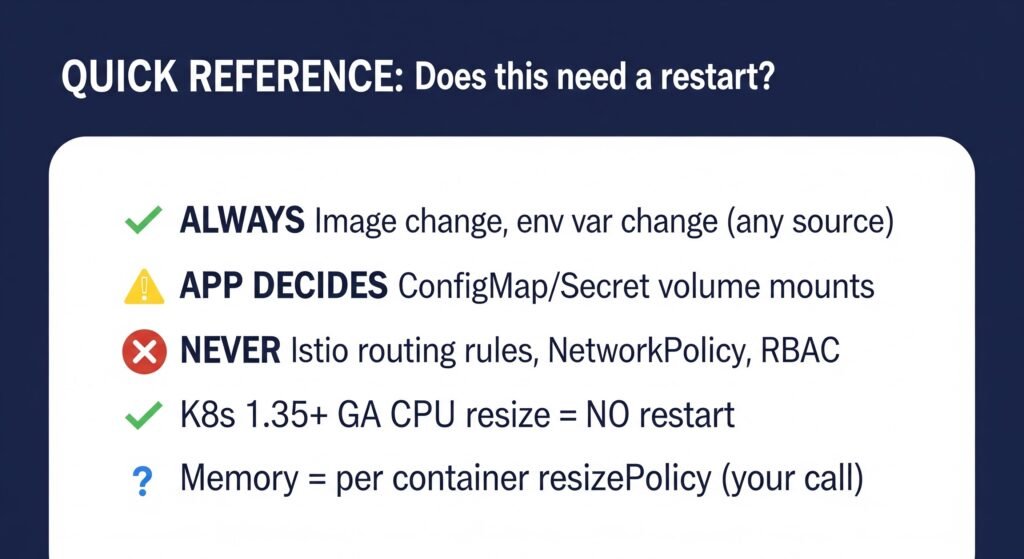
The Terminology Problem Every Engineer Gets Wrong
In production post-mortems, engineers say “the pod restarted” when they mean four different things. Getting this wrong leads to flawed runbooks and bad on-call decisions.
| Term | What Actually Happens | Pod UID Changes? | Pod IP Changes? | Restart Count |
|---|---|---|---|---|
| Container restart | Process killed and re-created. Pod object stays | No | No | +1 |
| Pod recreation | Pod object deleted. New pod scheduled | Yes | Yes | Resets to 0 |
| Rolling update | New ReplicaSet pods before old ones terminate | Yes | Yes | Resets to 0 |
| In-place resize (1.35 GA) | CPU/memory cgroups updated. Process untouched | No | No | 0 (CPU) or +1 (memory, if RestartContainer policy set) |
| In-place pod restart (1.35 alpha) | All containers restarted, pod object stays | No | No | +1 |
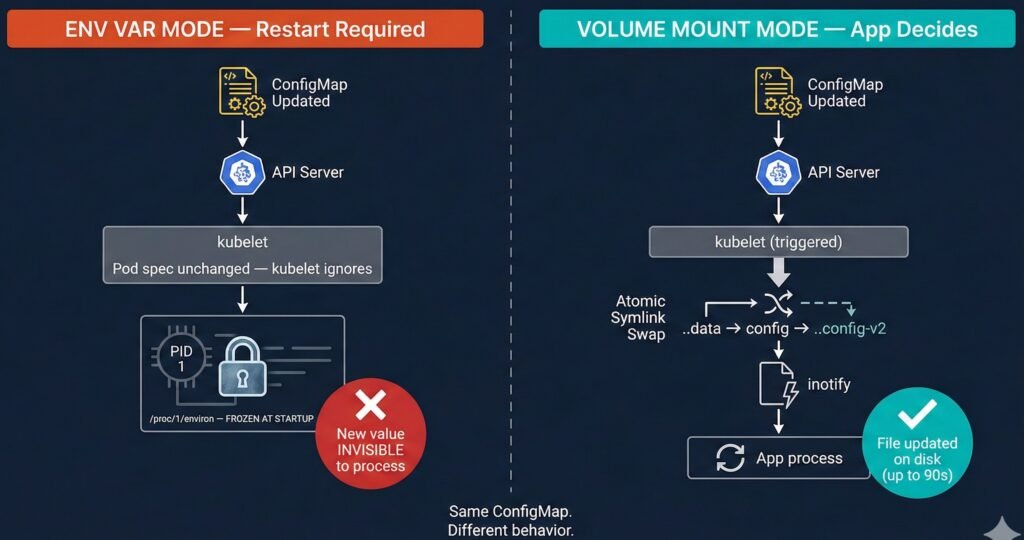
Diagram 1: ConfigMap consumed as env var (frozen) vs volume mount (auto-synced). Two-pod comparison with kubelet symlink swap detail.
⚠️ Note on in-place pod restart: This is alpha in 1.35. Behavior is inconsistent across runtimes. Do not automate against it or use in production until at minimum beta graduation.
The practical test: Did the pod UID change? If yes — that is pod recreation, not a restart. The restart count resets to zero, the IP changes, and the pod is an entirely new object. If no — the same pod object continued, and only the container process was killed and re-created inside it.
When someone says “the pod restarted” — ask which kind. The answer changes your entire debugging approach.
Part 1 — The Mental Model: How Kubernetes Decides
The kubelet Reconciliation Loop
Every restart decision flows through one engine: the kubelet reconciliation loop on each node.
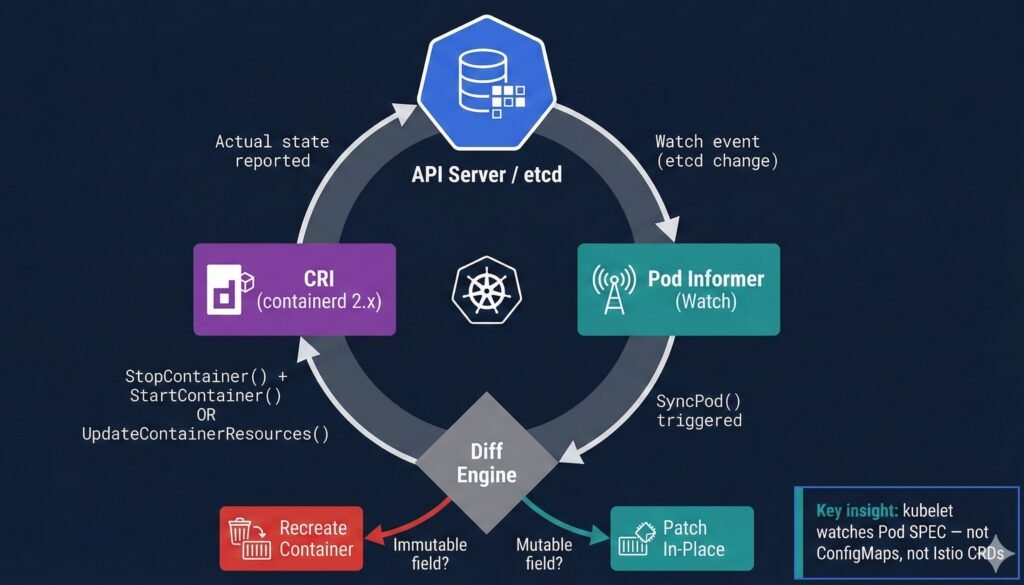
Diagram 2: kubelet reconciliation loop — watch event flow from API server through diff engine to CRI action.
The critical insight that most engineers miss: kubelet watches the pod spec — not ConfigMaps, not Secrets, not Istio CRDs. If you update a ConfigMap but the pod spec doesn’t change, kubelet never fires. The change is completely invisible to the reconciliation loop.
This single fact explains the majority of “why didn’t my config update?” investigations in production.
What CRI Does When a Container Restarts
When kubelet determines a container must restart, it calls the Container Runtime Interface (containerd 2.x from K8s 1.36+):
kubelet           containerd (CRI)              runc (OCI)
   │                    │                            │
   ├─StopContainer()───▶│                            │
   │                    ├─SIGTERM to PID 1 ─────────▶│
   │                    │  (terminationGracePeriod)  │
   │                    │◀─container exits ───────────│
   │                    │                            │
   ├─StartContainer()──▶│                            │
   │                    ├─fork/exec new PID 1 ───────▶│
   │                    │  env vars re-read HERE ◀── KEY
   │◀─container ID──────│                            │
At the fork/exec moment, env vars are copied fresh from the current pod spec into process memory. This is why a restart after a ConfigMap env var update does pick up the new value — but only because you explicitly triggered the restart. Without the restart, the process never sees the change.
Part 2 — The Master Decision Matrix
| Change Type | Restart Required? | Mechanism | Auto? | Version |
|---|---|---|---|---|
| Container image | Always (pod recreation) | Rolling update via new ReplicaSet | By Deployment controller | All |
| Env var (any source) | Always | Env baked at startup; kernel-immutable | Manual rollout | All |
| ConfigMap (volume mount) | ⚡ App decides | kubelet symlink-swap; inotify fires | Partial — app must act | All |
| Secret (volume mount) | ⚡ App decides | kubelet syncs (~60–90s delay) | Partial — app must act | All |
| Projected ServiceAccount token | Never | kubelet auto-rotates on disk | Automatic | 1.21+ |
| CPU requests/limits | No (1.35 GA) | cgroup quota updated in-place | Manual patch | 1.35 GA |
| Memory requests/limits | ⚡ Per resizePolicy | cgroup updated OR container restarted | Manual patch | 1.35 GA |
| Memory limit decrease | ⚡ Best-effort | kubelet checks usage vs new limit | Manual patch | New in 1.35 |
| Istio VirtualService | Never | xDS push via gRPC stream | Automatic | Istio 1.5+ |
| Istio DestinationRule | Never | xDS push to Envoy sidecar | Automatic | Istio 1.5+ |
| NetworkPolicy | Never | CNI agent updates eBPF/iptables rules | Automatic | All |
| Service (ports/ClusterIP) | Never | kube-proxy updates rules on node | Automatic | All |
| RBAC / ClusterRole | Never | API server enforces at request time | Automatic | All |
| PVC capacity increase | Never | CSI driver online expansion | Automatic | Depends on driver |
| Labels / Annotations | Usually | Metadata only; Reloader may trigger rollout | Operator-dependent | All |
| Node drain / eviction | Yes | Pod deleted; rescheduled elsewhere | Automatic | All |
Part 3 — Deep Scenario Dives
Scenario 1: ConfigMap Changes
This is the most misunderstood scenario in Kubernetes. The same ConfigMap change behaves completely differently depending on how it is consumed.
The Two Modes — Completely Different Behavior
Mode A — Environment Variable (envFrom / valueFrom):
The process reads env vars once at startup. The kernel copies them into /proc/<pid>/environ — memory owned by the process, untouchable by any external system. When you update the ConfigMap, kubelet sees no pod spec change and does nothing. The process keeps running with the original values indefinitely.
Mode B — Volume Mount:
kubelet syncs the ConfigMap to the node filesystem via an atomic symlink swap — not a simple file write. This is subtle and breaks most naive reload implementations:
/etc/config/
├── ..2025_12_19_11_30_00/   ← NEW data dir (kubelet creates this)
│   └── APP_COLOR            ← new content: "red"
├── ..data ──────────────────▶ ..2025_12_19_11_30_00/  ← symlink SWAPPED
└── APP_COLOR ───────────────▶ ..data/APP_COLOR
The symlink swap generates IN_CREATE on ..data — not IN_MODIFY on the file. Applications watching for IN_MODIFY on an open file descriptor miss this entirely.
Lab evidence (from 01-configmap/ in the companion repo):
ConfigMap updated: APP_COLOR blue → red

Pod A (env var):      APP_COLOR=blue  ← still old value, restart count: 0
Pod B (volume mount): APP_COLOR=red   ← updated automatically, restart count: 0

Conclusion: volume mount updated without restart.
            env var frozen until pod restart.
The correct inotify pattern — watch the directory, listen for IN_CREATE:
// Watch the DIRECTORY, not the file
watcher.Add(filepath.Dir(configPath))  // ✅ /etc/config/
// watcher.Add(configPath)             // ❌ misses symlink swap

for event := range watcher.Events {
    if event.Op&fsnotify.Create == fsnotify.Create {
        reloadConfig()
    }
}
Propagation Flow
Developer      kubectl       API Server       kubelet          App Process
    │              │               │               │                │
    ├─apply cm────▶│               │               │                │
    │              ├─PUT /cm──────▶│               │                │
    │              │               ├─store etcd    │                │
    │              │               │◀─watch event──┤                │
    │              │               │  [up to 90s]  │                │
    │              │               │               ├─symlink swap──▶│
    │              │               │               │  IN_CREATE     │
    │              │               │               │◀───────────────┤
    │              │               │               │  (if watching) │
    │              │               │               │                ├─reload()
Scenario 2: Secret Updates
Secrets use the exact same kubelet symlink-swap mechanism as ConfigMaps for volume mounts. The file structure inside the pod is identical:
/etc/secrets/
├── ..2026_02_21_03_12_10/
│   └── DB_PASSWORD          ← new value
├── ..data ──────────────────▶ ..2026_02_21_03_12_10/
└── DB_PASSWORD ─────────────▶ ..data/DB_PASSWORD
Lab evidence (from 02-secret/ in the companion repo):
Secret updated: DB_PASSWORD db-password → env-db-password

Pod A (env var):      DB_PASSWORD=db-password      ← frozen at startup
Pod B (volume mount): DB_PASSWORD=env-db-password  ← kubelet synced

Both restart counts: 0

After restarting Pod A:
Pod A (env var):      DB_PASSWORD=env-db-password  ← picked up on restart
Two operational differences from ConfigMaps worth noting:
Sync delay: Expect 60–90 seconds before new secret content appears on disk. Plan certificate rotation and secret rotation runbooks around this window.
Projected ServiceAccount tokens (K8s 1.21+) are managed entirely by kubelet. Rotation is automatic and transparent — no application action needed, no restart ever.
| Secret Type | Mount Mode | Restart Needed? |
|---|---|---|
| Opaque | envFrom | Yes |
| Opaque | volumeMount | App must reload |
| TLS certificate | volumeMount | App must reload (nginx -s reload, etc.) |
| Projected ServiceAccount | projected | Never — kubelet manages |
Secrets are base64-encoded in etcd. To verify what Kubernetes currently stores:
kubectl get secret my-secret -n my-namespace \
  -o jsonpath='{.data.DB_PASSWORD}' | base64 -d && echo
Scenario 3: Container Image Updates — Three Scenarios
An image change always requires pod recreation via rolling update. But not all image-related failures behave the same way — and understanding the differences is essential for production debugging.
Scenario A: Successful Image Update
When you run kubectl set image, Kubernetes creates a new ReplicaSet for the new image, scales it up, and scales down the old ReplicaSet once new pods are healthy.
Rolling update (maxUnavailable: 1, maxSurge: 1):

[v1][v1]
[v1][v1][v2]    ← new pod created (surge)
[v1][✕ ][v2]    ← one old pod terminated after new one is Ready
[v2][v2]        ← complete
Lab evidence:
BEFORE:
  Pod name: image-demo-abc123-xyz
  Pod UID:  aaa-bbb-ccc
  Pod IP:   10.244.1.5
  Image:    nginx:1.25

AFTER kubectl set image:
  Pod name: image-demo-def456-uvw   ← completely different
  Pod UID:  xxx-yyy-zzz              ← completely different
  Pod IP:   10.244.1.6              ← completely different
  Image:    nginx:1.27

Two ReplicaSets:
  RS-old (nginx:1.25) → 0 pods  (kept for rollback)
  RS-new (nginx:1.27) → 1 pod   (running)
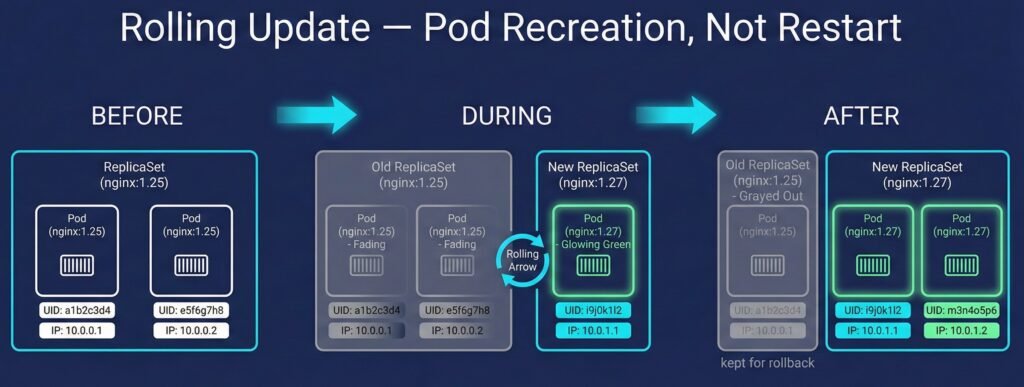
Diagram 3: Rolling update flow showing new ReplicaSet creation, pod recreation, and old RS retained for rollback.
This is NOT a restart — it is pod recreation. The old pod object was deleted. A brand new pod was created. The restart count resets to zero.
Scenario B: Bad Image (ImagePullBackOff)
When you update to a non-existent image tag, the new pod gets stuck in ImagePullBackOff. Kubernetes protects you: the old pods keep running until the new ones are healthy.
Old pod:     image-demo-abc123   Running   nginx:1.27  ← still serving traffic
New pod:     image-demo-def456   ImagePullBackOff      ← stuck, cannot pull
Key takeaway: Your application stays available. Kubernetes never kills what is working until the replacement is confirmed healthy. This is why rolling updates are safe by default — the old pod is your safety net.
To recover: roll back or fix the image tag.
kubectl rollout undo deployment/image-demo -n restart-demos
Scenario C: CrashLoopBackOff
When the image exists and pulls successfully but the container process exits immediately (bad command, missing dependency, misconfiguration), Kubernetes enters CrashLoopBackOff.
This is the critical contrast with image updates:
CrashLoopBackOff:
  Pod name:      image-demo-abc123  ← SAME (same pod object)
  Pod UID:       aaa-bbb-ccc        ← SAME
  Pod IP:        10.244.1.5         ← SAME
  Restart count: 0 → 1 → 2 → 3 → ...  ← climbing with each crash

Image Update (Scenario A):
  Pod name:      image-demo-def456  ← DIFFERENT (new pod object)
  Pod UID:       xxx-yyy-zzz        ← DIFFERENT
  Pod IP:        10.244.1.6         ← DIFFERENT
  Restart count: 0                  ← resets, fresh pod
When someone says “the pod is restarting” — check the restart count and the pod UID. A climbing restart count with unchanged UID means crash loop. A zero restart count with a new UID means rolling update or recreation.
Scenario 4: Resource Limits — In-Place Resize (K8s 1.35 GA)
This is the scenario where most published content is outdated.
Version History
| Version | Status | Key Change |
|---|---|---|
| 1.27 | Alpha | Initial implementation (KEP #1287) |
| 1.33 | Beta | Enabled by default |
| 1.35 | GA ✅ | Memory decrease allowed; prioritized resize queue; new kubelet metrics |
| 1.36 (expected Apr 2026) | VPA integration | InPlaceOrRecreate expected to reach beta |
What K8s 1.35 Actually Enables
Both CPU and memory can be resized without pod recreation. In both cases:
- Pod UID stays the same
- Pod IP stays the same
- The pod object is never deleted or recreated
This is what GA means. The pod object is fully preserved.
What happens to the CONTAINER depends entirely on resizePolicy — which is your choice, not Kubernetes forcing it.
Per-Container resizePolicy — This is Your Decision
resizePolicy:
- resourceName: cpu
  restartPolicy: NotRequired      # CPU: no restart — safe for all runtimes
- resourceName: memory
  restartPolicy: RestartContainer # Memory: we chose this because nginx
                                  # allocates memory at startup
Why the difference matters:
CPU is just a cgroup quota — the kernel throttles or allows more CPU cycles. The running process does not know or care. No restart needed.
Memory is different. The JVM, Python interpreter, Node.js — they allocate heap at startup based on available memory. If you increase the memory limit without a restart, the process cannot use the new headroom because it already decided its heap size at startup. Setting RestartContainer for memory is the correct choice for most runtimes.
The default if you do not define resizePolicy is NotRequired for both CPU and memory. This means a memory resize will silently update the cgroup limit without restarting the container — and your JVM will never know more memory is available. Always define resizePolicy explicitly for memory.
Lab Evidence (K8s 1.35, companion repo 05-resource-resize/)
BASELINE:
  Pod UID:  d7c99204-f099-44d9-97e4-de4f051d3c4b
  Pod IP:   10.244.0.7
  CPU:      200m limit
  Memory:   256Mi limit
  Restarts: 0

AFTER CPU resize (NotRequired policy):
  Pod UID:  d7c99204-f099-44d9-97e4-de4f051d3c4b  ← unchanged
  Pod IP:   10.244.0.7                             ← unchanged
  CPU:      500m limit                             ← updated
  Restarts: 0                                      ← unchanged

AFTER Memory resize (RestartContainer policy):
  Pod UID:  d7c99204-f099-44d9-97e4-de4f051d3c4b  ← unchanged (K8s 1.35 GA)
  Pod IP:   10.244.0.7                             ← unchanged (K8s 1.35 GA)
  Memory:   512Mi limit                            ← updated
  Restarts: 1                                      ← our resizePolicy choice
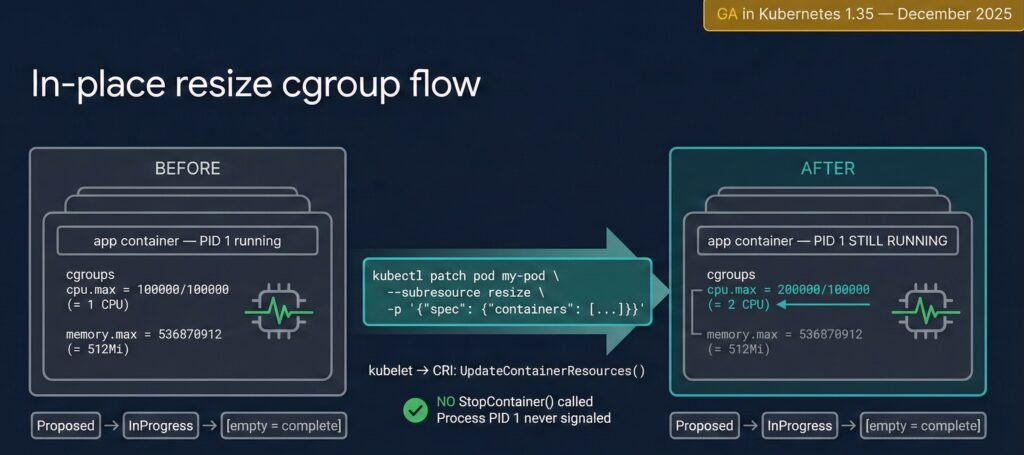
Diagram 4: In-place resize cgroup flow — CPU quota update vs memory RestartContainer policy. Pod UID and IP unchanged in both cases.
How to Apply a Resize
kubectl patch pod my-pod -n my-namespace \
  --subresource resize \
  -p '{"spec":{"containers":[{"name":"app","resources":{
    "requests":{"cpu":"250m","memory":"128Mi"},
    "limits":{"cpu":"500m","memory":"256Mi"}
  }}]}}'
Note: do not use --type=merge with --subresource resize — it causes a validation error. The patch format above works correctly.
Resize State Machine
kubectl get pod my-pod -o jsonpath='{.status.resize}'
# Proposed → InProgress → (empty = complete)
# OR: Deferred (node lacks capacity)
# OR: Infeasible (QoS class mismatch)
Current limitations (as of 1.35 GA): Cannot be used simultaneously with swap memory, static CPU Manager, or static Memory Manager. Only CPU and memory are resizable — GPU, hugepages, and other extended resources remain immutable.
Scenario 5: Istio Routing Rules
Istio VirtualService, DestinationRule, and PeerAuthentication changes never require pod restarts. Understanding why requires knowing the xDS protocol.
Istiod maintains a persistent bidirectional gRPC stream to each Envoy sidecar. When you apply a VirtualService, Istiod translates it to Envoy’s native proto format and pushes it over this existing connection in milliseconds. No pod is touched. No file is written to disk.
kubectl apply VirtualService
       │
API Server stores CRD ──▶ Istiod informer fires
                                  │
                          Translate to Envoy proto
                                  │
                    xDS ADS gRPC stream (persistent)
                                  │ milliseconds
                                  ▼
                    Envoy sidecar: in-memory route swap
                    Your app container: completely unaware
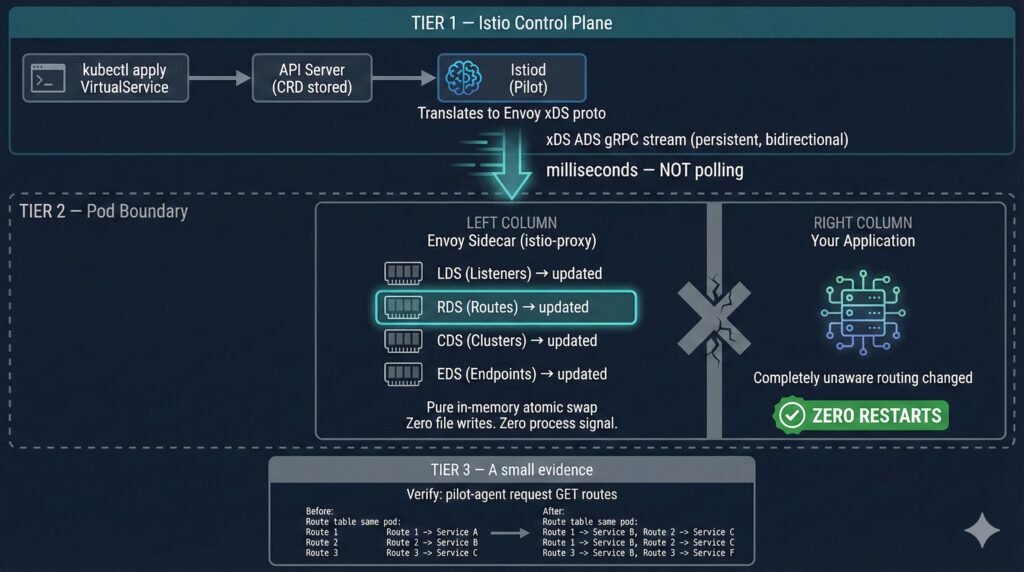
Diagram 5: Istiod xDS gRPC push to Envoy sidecar — routing updated in memory, zero pod restarts.
Lab evidence (from 04-istio-routing/ in the companion repo):
Four echo pods running. Three routing changes applied:
  Change 1: 100% traffic → v1
  Change 2: 80% v1 / 20% v2 (canary)
  Change 3: 100% traffic → v2

Restart counts across all four pods:
  BEFORE all changes: 0 0 0 0
  AFTER all changes:  0 0 0 0

Pod ages: unchanged — same pods running throughout all three changes.

✅ CONFIRMED: Three routing changes. Zero pod restarts.
Scenario 6: Environment Variables — Permanently Frozen
Environment variables are the most immutable aspect of a running process. At execve(), the kernel copies the env block into the process’s virtual memory. That memory is owned by the process. No external system can modify it while the process runs.
This is not a Kubernetes limitation. It is a POSIX kernel contract.
Practical consequence: If you update a ConfigMap and your app consumes it via envFrom, you must trigger a rollout restart. This should be automated — not a manual step in a runbook.
kubectl rollout restart deployment/my-app
kubectl rollout status deployment/my-app
Stakater Reloader automates exactly this step (see Scenario 9 below).
Scenario 7: Network Policies
NetworkPolicy changes are enforced entirely in the data plane by the CNI plugin. Running pods are never touched.
NetworkPolicy applied
       │
API Server stores it ──▶ CNI agent watch fires
                                │
                    Node-level rules updated:
                    ├── eBPF maps (Cilium)
                    ├── iptables FORWARD rules
                    └── nftables ruleset (recommended, K8s 1.35+)
                                │
                    Next packet governed by new policy
                    Pod PIDs: zero awareness, zero restart
Note on kube-proxy mode: IPVS mode is deprecated in Kubernetes 1.35 and is planned for removal in a future release. If you are using IPVS mode, begin evaluating migration to nftables now. Managed Kubernetes providers typically lag upstream by 4–8 weeks — verify your provider’s timeline before planning upgrades.
Scenario 8: Stateful vs. Stateless Workloads
The restart decision carries fundamentally different operational weight depending on workload type.
For stateless services (API gateways, web frontends), restart risk is low and recovery is fast. The main concern is in-flight request disruption — mitigate with preStop hooks and graceful shutdown handlers.
For stateful workloads, a restart is a significant operational event:
| Workload | Restart Cost | Recommended Strategy |
|---|---|---|
| JVM service (Spring Boot) | 30–120s JIT warm-up | CPU resize in-place (1.35+); SIGHUP config reload |
| PostgreSQL | WAL replay, checkpoint, connection re-establishment | PodDisruptionBudget; in-place resize for buffer tuning |
| ML training job | Checkpoint reload, data loader re-init | In-place CPU resize during training; staged memory changes |
| Redis | AOF/RDB restore, replica sync | Memory limit changes via RestartContainer policy |
| Game server | Player session loss | Prime use case for in-place resize — official K8s 1.35 blog highlights this |
StatefulSet maxUnavailable (Beta in K8s 1.35) — previously always 1, now configurable:
updateStrategy:
  type: RollingUpdate
  rollingUpdate:
    maxUnavailable: 2  # or "30%"
Combined with podManagementPolicy: Parallel, this can reduce StatefulSet update time significantly for workloads that tolerate multiple pods being temporarily unavailable. Lab coverage for this scenario is in progress — the theory is covered here, hands-on scripts will be added to 06-statefulset-maxunavailable/ in the companion repo when available.
Scenario 9: Stakater Reloader — Automating the Manual Step
Reloader bridges the gap between ConfigMap/Secret updates and the rollout restart that env var pods require.
How It Works
Reloader runs as a Deployment in your cluster, watching ConfigMaps and Secrets via Kubernetes watch events — the same mechanism as kubelet. Detection is near-instant (milliseconds), not polling on an interval.
When a ConfigMap changes:
- Reloader computes SHA256 of the new ConfigMap data
- Compares with previous hash — if different, proceeds
- Writes the new hash as an annotation on the pod template
- Deployment controller sees the template changed → triggers rolling update
- New pods start with updated env vars
# One annotation on your Deployment — Reloader handles the rest
metadata:
  annotations:
    reloader.stakater.com/auto: "true"
Lab evidence (from 07-stakater-reloader/ in the companion repo):
ConfigMap updated: APP_MESSAGE → "Hello from OpsCart v2 — auto reloaded!"

Without Reloader:
  1. Update ConfigMap
  2. Remember to run: kubectl rollout restart deployment/x
  3. Hope nobody forgets step 2 at 2am

With Reloader:
  1. Update ConfigMap
  2. Done.

New pod APP_MESSAGE: Hello from OpsCart v2 — auto reloaded! ✅
Rolling restart triggered automatically. No human intervention.
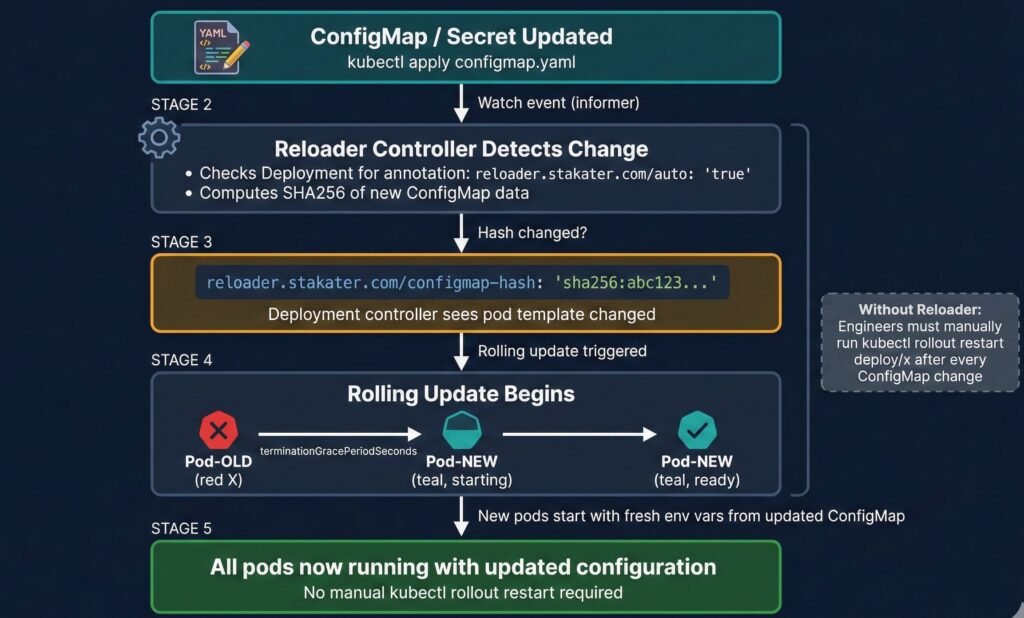
Diagram 7: Stakater Reloader internal flow — ConfigMap change detection, SHA256 hash annotation, rolling restart trigger.
Critical Production Setting: watchGlobally
# Default installation — watches only the reloader namespace
helm install reloader stakater/reloader \
  --set reloader.watchGlobally=false  ← DEFAULT

# What you almost certainly want — watches all namespaces
helm install reloader stakater/reloader \
  --set reloader.watchGlobally=true
This is a common production gotcha. With watchGlobally=false (the default), Reloader only watches the namespace it is installed in. Any annotated Deployments in other namespaces are silently ignored — Reloader will not trigger restarts for them, and no error is thrown. Always install with watchGlobally=true unless you have a specific reason to scope it.
Verify Reloader is watching your Deployments:
kubectl logs -n reloader \
  -l app.kubernetes.io/name=reloader --tail=20
# Should show: "Reloading deployment <ns>/<name> because of configmap <ns>/<cm>"
Part 4 — Application Responsibility
The most resilient architecture makes the application itself responsible for config reload — no sidecars, no operators, no restarts for routine config changes.
The SIGHUP pattern: register a signal handler, re-read config from disk, atomic pointer swap, continue serving. Zero downtime.
sigs := make(chan os.Signal, 1)
signal.Notify(sigs, syscall.SIGHUP)
go func() {
    for range sigs {
        newConfig := loadConfig(configPath)
        configPtr.Store(&newConfig)  // atomic swap
    }
}()
When your app cannot self-reload — Stakater Reloader bridges the gap. It still triggers a pod restart, but it does so automatically, consistently, and without requiring engineers to remember a manual step.
Part 5 — The Decision Flowchart
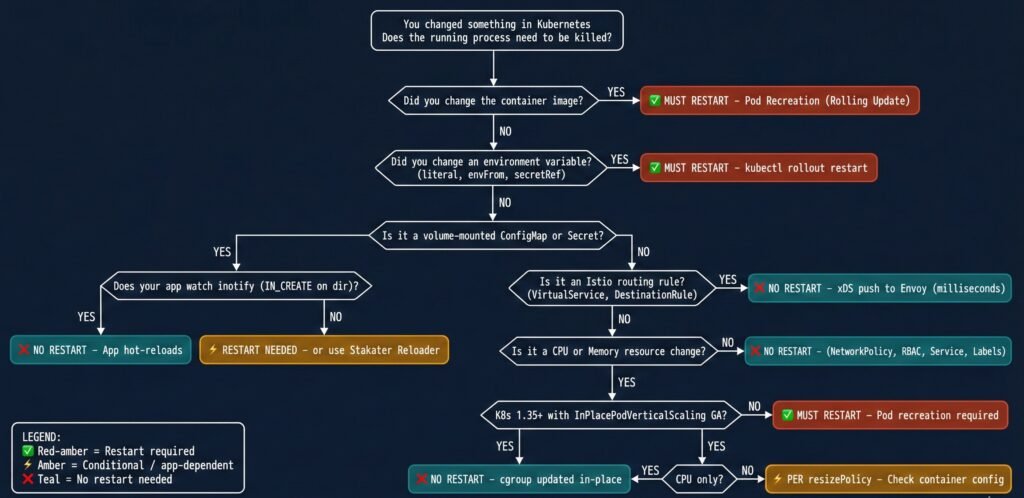
Diagram 6: Complete decision flowchart — does this change require a pod restart?
Part 6 — Risks & Caveats: When Hot-Reload Goes Wrong
ConfigMap reload accepted, config semantically invalid. The file is updated on disk, the inotify handler fires, but the new configuration has a logic error. The application continues running and passes health checks but is silently broken. A restart with a bad config fails immediately and loudly. A hot-reload with a bad config fails quietly and late.
Mitigation: Validate config before swapping. Implement a dry-run step in your reload handler before applying the new config atomically.
Envoy rejects xDS push silently. Istiod pushes a new RouteConfiguration referencing a cluster not yet propagated. Envoy rejects the update and continues with previous routing rules. No pod event fires.
Mitigation: Monitor pilot_xds_pushes and pilot_xds_push_errors metrics. Use istioctl proxy-status to verify all sidecars are in sync.
Secret rotated on disk, existing connections still use old credential. Long-lived gRPC connections were established with the old certificate and keep running. Downstream services may see validation failures on reconnect.
Mitigation: Design long-lived connections with explicit reconnection logic triggered on credential rotation events. Set maximum connection ages on gRPC channels.
The broader principle: A pod restart is disruptive but its failure modes are immediate, visible, and well-understood. Hot-reload patterns optimize for availability but shift failure modes to be delayed, subtle, and harder to correlate. Both are valid production strategies — the choice should be conscious, not accidental.
Part 7 — Observability Signals
| Change Type | Primary Signal | Tool / Command |
|---|---|---|
| ConfigMap env var | restartCount unchanged, old value in env | kubectl exec -- env | grep KEY |
| ConfigMap volume | File modification time on mount | kubectl exec -- ls -la /etc/config/ |
| In-place resize | .status.resize field; kubelet metrics | kubectl get pod -o jsonpath='{.status.resize}' |
| Image rollout | ReplicaSet age; pod AGE column | kubectl get rs |
| Pod recreation vs restart | Pod UID change | kubectl get pod -o jsonpath='{.metadata.uid}' |
| Istio routing | Envoy route table; xDS sync status | kubectl exec -c istio-proxy -- pilot-agent request GET routes |
| Istio sync lag | Control plane vs data plane version | istioctl proxy-status |
| NetworkPolicy | Dropped packet counter; flow logs | CNI-specific (Hubble for Cilium) |
| Secret rotation | File mtime on volume mount | kubectl exec -- ls -la /etc/secrets/ |
| Reloader trigger | Deployment annotation hash; rollout status | kubectl get deploy -o jsonpath='{.spec.template.metadata.annotations}' |
Three commands that should be in every operator’s muscle memory:
# 1. Has this pod restarted — or was it recreated?
kubectl get pod <pod> -o custom-columns=\
"NAME:.metadata.name,UID:.metadata.uid,IP:.status.podIP,RESTARTS:.status.containerStatuses[0].restartCount"

# 2. What events does Kubernetes have on this pod?
kubectl describe pod <pod> | grep -A 20 "Events:"

# 3. What is the current resize status?
kubectl get pod <pod> -o jsonpath='{.status.resize}'
Part 8 — Component Deep Dive
Pod
A Pod is an API object in etcd — a declaration of desired state. It is not a running process. The pod object can exist after all its containers have exited. Senior engineers reason about two planes simultaneously: the API object and the actual process on the node. Most production confusion happens when engineers conflate them.
kubelet
kubelet bridges desired state (API) and actual state (CRI). It runs a reconciliation loop triggered by watch events for spec changes, and a periodic sync (default: 1 minute) for volume content. This is why ConfigMap volume updates can lag up to 90 seconds — the file change and the watch event are on different cadences.
The metadata.generation and status.observedGeneration fields (stable in K8s 1.35, KEP #5067) now give controllers and GitOps pipelines a reliable way to confirm kubelet has processed a spec update.
API Server
The API server enforces pod spec immutability. A PATCH to change a container’s image directly on a running pod is rejected. The --subresource resize endpoint is a specific exception carved out by KEP #1287, allowing CPU and memory mutation while keeping everything else immutable.
Container Runtime (CRI / containerd)
From K8s 1.36, containerd 2.x is mandatory (containerd 1.x end-of-life in 1.35). The CRI interface exposes UpdateContainerResources() — the call that makes in-place resize possible without StopContainer().
Scheduler
The scheduler acts only at pod creation time. Once a pod is bound to a node, the scheduler is entirely out of the picture. In-place resize is a kubelet + CRI operation — the scheduler has no role.
Istio Sidecar (Envoy)
Envoy’s routing configuration lives entirely in memory, managed through the xDS API. There are no config files on disk that Envoy reads for routing decisions — which is precisely why disk-level changes and pod restarts are irrelevant to Istio routing behavior.
Part 9 — K8s 1.36 Preview
Disclaimer: The items below are based on KEPs currently merged or in late-stage development as of February 2026. Alpha features are not guaranteed to reach beta or GA on the stated timeline.
| Feature | Expected Stage | Relevance to Restart Topic |
|---|---|---|
| IPVS mode removal | Planned removal | Ops: migrate to nftables before upgrading |
| containerd 1.x removal | Removal | Must be on containerd 2.x before upgrading |
VPA InPlaceOrRecreate | Beta (graduation) | Automated vertical scaling using 1.35 GA resize |
| HPA scale-to-zero | Alpha | Pods created/deleted, not restarted |
| Gang Scheduling | Alpha stabilization | All-or-nothing pod creation; restart mechanics unchanged |
If you are on a managed Kubernetes provider: upstream K8s 1.36 is expected April 22, 2026. Managed providers typically ship 4–8 weeks after upstream GA. Begin containerd 2.x validation and nftables evaluation in staging now.
Part 10 — Conclusion: The Systems-Thinking Perspective
Throughout this article, we have treated “restart or not” as a technical question with a correct answer per scenario. At the component level that is true. At the systems level it is more nuanced.
Restarts are expensive but honest. When a pod restarts, the failure mode is immediate and visible. A bad config causes a crash on startup. An OOM kill fires an event. The system’s state is explicit.
Hot-reload is efficient but quiet. When config reloads succeed silently, that is excellent. When they fail silently — semantically invalid config, rejected xDS push, stale TLS session — the failure mode is delayed and ambiguous. The pod looks healthy. Health probes pass. Alerts stay quiet. The actual problem surfaces minutes or hours later, detached from its cause.
This asymmetry has a direct implication for AI-assisted automation and self-healing platforms. An automated remediation system that sees an anomalous metric and decides to restart a pod is making a bet: that the restart will resolve the issue and that the cost is acceptable. If the system cannot distinguish between “this anomaly requires a restart” and “this anomaly would self-resolve via hot-reload in 30 seconds,” it will generate unnecessary restarts that reset JVM JIT caches, interrupt in-flight transactions, and create thundering-herd reconnections — all in the name of healing.
The goal of production-grade Kubernetes operations — and what tools like opscart-k8s-watcher are designed to address — is not to automate restarts faster. It is to understand deeply enough that you restart only when the process genuinely needs to die, and use every other mechanism available when it does not.
Summary Table
| Change | Restart Process? | Pod Recreated? | Automatic? | K8s Version |
|---|---|---|---|---|
| ConfigMap (env var) | ✅ Yes | No | Manual | All |
| ConfigMap (volume) | ⚡ App decides | No | Partial | All |
| Secret (env var) | ✅ Yes | No | Manual | All |
| Secret (volume) | ⚡ App decides | No | Partial | All |
| Projected SA token | ❌ Never | No | Auto | 1.21+ |
| Container image | ✅ Yes | Yes | Auto (Deployment) | All |
| Bad image (ImagePullBackOff) | ❌ Old pod protected | Old pod stays | Manual fix needed | All |
| CrashLoopBackOff | ✅ Yes (same pod) | No | Auto (kubelet) | All |
| CPU limit (1.35+) | ❌ Never | No | Manual patch | 1.35 GA |
| Memory limit (1.35+) | ⚡ Per resizePolicy | No | Manual patch | 1.35 GA |
| Istio VirtualService | ❌ Never | No | Auto (xDS) | Istio 1.5+ |
| NetworkPolicy | ❌ Never | No | Auto (CNI) | All |
| Service ports | ❌ Never | No | Auto | All |
| Node drain | ✅ Yes | Yes | Auto | All |
| RBAC | ❌ Never | No | Auto | All |
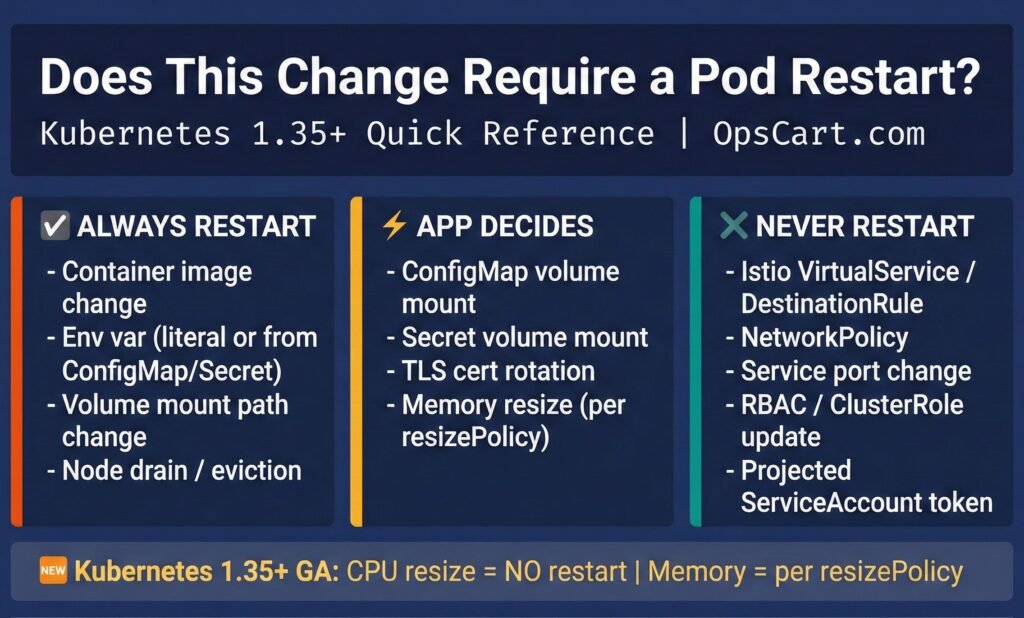
Diagram 8: Quick Reference Card — printable cheat sheet for when Kubernetes restarts your pod.
Companion repository: github.com/opscart/k8s-pod-restart-mechanics — hands-on lab scripts organized by scenario, all manifests, runnable on Minikube.
Other related repository: https://github.com/opscart/k8s-135-labs — Focused on major 1.35 feature, includes hands-on lab and scripts