
This guide is part of the Kubernetes Guide — a complete topic cluster covering Kubernetes concepts, operations, and production debugging.
Introduction
Networking is where most Kubernetes confusion lives. Engineers who understand containers and deployments well often hit a wall when they try to reason about why a service is unreachable, why DNS fails intermittently, or why traffic is not routing through an Ingress correctly.
Kubernetes networking is not a single system — it is four distinct layers stacked on top of each other. Each layer solves a different problem, and each has its own failure modes. When something breaks, you need to know which layer is responsible before you start debugging.
Layer 4: Ingress          — routes external HTTP/HTTPS into the cluster
Layer 3: Services         — stable DNS names and load balancing across pods
Layer 2: Pod Networking   — pod-to-pod communication across nodes
Layer 1: Container        — container-to-container within a pod (localhost)
This guide covers all four layers: how pod networking works, how Services provide stable addressing, how DNS resolution flows through CoreDNS, how Ingress routes external traffic, and how NetworkPolicies control what can talk to what. Each section ends with the most common failure pattern for that layer.
1. The Three Fundamental Networking Rules
Before anything else, Kubernetes defines three rules that every networking implementation must satisfy:
Rule 1: Every pod gets its own unique IP address.
Rule 2: All pods can communicate with all other pods directly, without NAT, regardless of which node they are on.
Rule 3: All nodes can communicate with all pods without NAT.
These rules sound simple but have significant implications. They mean there is no port mapping — a pod listening on port 8080 is reachable at <pod-ip>:8080 from anywhere in the cluster. They mean routing is flat — no translation layer between pods. They mean the networking model scales horizontally without configuration changes.
The implementation of these rules is handled by the CNI (Container Network Interface) plugin — a pluggable component that assigns IPs and configures routing on each node.
2. Pod Networking and the CNI
When a pod is scheduled to a node, the CNI plugin is responsible for:
- Assigning an IP address to the pod from the cluster’s pod CIDR range
- Creating a virtual network interface inside the pod’s network namespace
- Configuring routing so the pod can reach other pods on other nodes
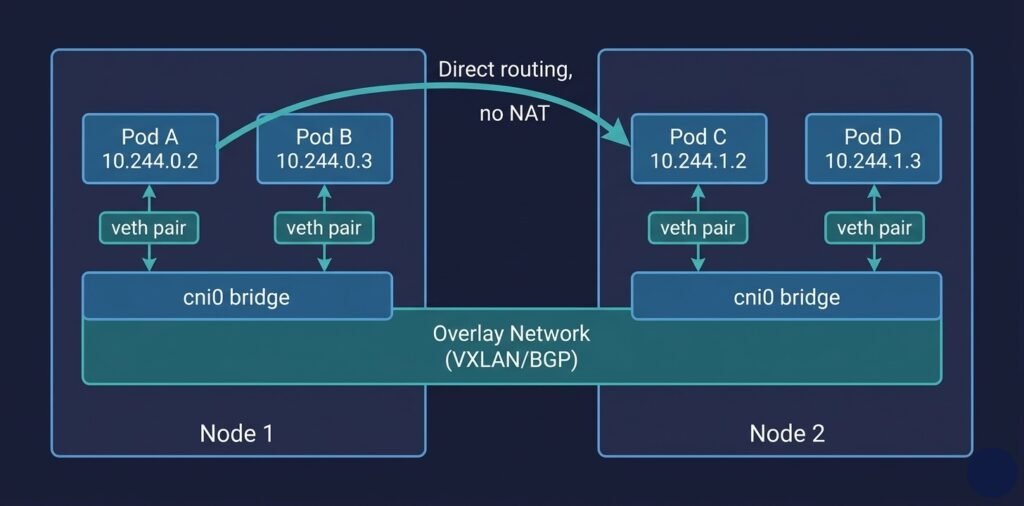
DIAGRAM: Pod networking across two nodes — Node 1 contains Pod A (10.244.0.2) and Pod B (10.244.0.3) connected via virtual ethernet (veth) pairs to a cni0 bridge. Node 2 contains Pod C (10.244.1.2) and Pod D (10.244.1.3) connected similarly. The two bridges connect via an overlay network or BGP routing layer. Show a direct arrow from Pod A to Pod C across nodes labeled “direct pod-to-pod, no NAT.
CNI Plugin Options
| CNI Plugin | Approach | Best for |
|---|---|---|
| Calico | BGP routing or overlay, supports NetworkPolicy | Production, policy enforcement |
| Cilium | eBPF-based, L7 visibility, high performance | High-scale, observability-heavy clusters |
| Flannel | Simple VXLAN overlay | Development, simple setups |
| Azure CNI | Native VNet IPs assigned to pods | AKS — pods get real Azure subnet IPs |
| AWS VPC CNI | Native VPC IPs assigned to pods | EKS — same model as Azure CNI |
Azure CNI vs Kubenet in AKS: Azure CNI assigns your pod IPs from your VNet subnet directly. Pods are first-class VNet citizens — you can use NSGs, route tables, and Azure Firewall against pod IPs. Kubenet (simpler, uses NAT) is cheaper but limits advanced networking scenarios.
3. Kubernetes Services
Pod IPs are ephemeral. When a pod is deleted and recreated — during a rolling update, after a crash, after a node replacement — it gets a new IP. Any application that hardcodes a pod IP will break the next time that pod is replaced.
Services solve this by providing a stable virtual IP (ClusterIP) and a stable DNS name that always resolves to healthy pod endpoints, regardless of which pods are currently running or what their IPs are.
         Client Pod
              │
              │  curl http://api-service:8080
              ▼
         Service (ClusterIP: 10.96.14.200)
              │
              │  kube-proxy load balances across healthy endpoints
              ├──────────────────────────┐
              ▼                          ▼
         Pod A (10.244.0.2:8080)    Pod B (10.244.0.3:8080)
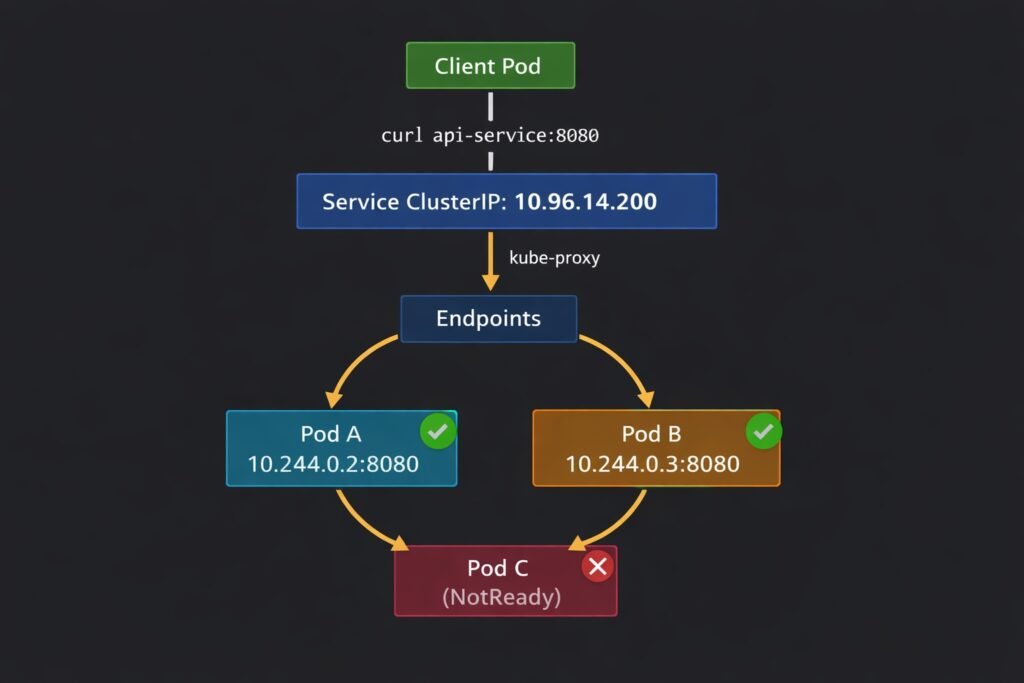
DIAGRAM: Kubernetes Service routing — show a ‘Client Pod’ at the top sending a request to ‘api-service:8080’. Arrow goes down to a ‘Service (ClusterIP: 10.96.14.200)’ box. Below the service, kube-proxy routes to two pod endpoints: ‘Pod A 10.244.0.2:8080’ and ‘Pod B 10.244.0.3:8080’. Show a third pod ‘Pod C (unhealthy)’ crossed out with an X, not receiving traffic because readiness probe is failing.
Service Types
ClusterIP — the default. Creates a virtual IP reachable only from within the cluster. Use this for internal service-to-service communication.
apiVersion: v1
kind: Service
metadata:
  name: api-service
  namespace: production
spec:
  type: ClusterIP        # default — internal only
  selector:
    app: api             # routes to all pods with this label
  ports:
  - port: 8080           # port the Service listens on
    targetPort: 8080     # port the pod container listens on
NodePort — exposes the Service on a static port on every node’s IP (range 30000–32767). Rarely used in production — LoadBalancer is preferred for external access.
LoadBalancer — provisions a cloud load balancer (Azure Load Balancer, AWS ELB, GCP Cloud LB) with a public IP. The cloud controller manager handles provisioning automatically.
spec:
  type: LoadBalancer
  selector:
    app: api
  ports:
  - port: 80
    targetPort: 8080
ExternalName — maps the Service to an external DNS name. Useful for referencing external databases or APIs using Kubernetes DNS names inside the cluster.
Headless Services — setting clusterIP: None creates a headless Service. Instead of a ClusterIP, DNS returns the individual pod IPs directly. Used by StatefulSets where clients need to connect to a specific pod (Kafka, Cassandra, etcd).
How kube-proxy Implements Service Routing
When you create a Service, kube-proxy on every node programs iptables rules (or IPVS rules) that forward traffic destined for the ClusterIP to one of the pod endpoints. This happens at the kernel level — no userspace proxying, no application-level load balancer.
# See the iptables rules kube-proxy creates for a service
iptables -t nat -L KUBE-SERVICES | grep <service-cluster-ip>
The endpoint list is maintained dynamically. When a pod fails its readiness probe, the Endpoints controller removes it from the list. kube-proxy updates the iptables rules within seconds. Healthy pods receive traffic; unhealthy pods do not.
4. Kubernetes DNS with CoreDNS
Every pod in Kubernetes is automatically configured to use CoreDNS as its DNS resolver. When a pod makes a DNS query, it goes to CoreDNS, which resolves Kubernetes Service names and proxies external queries to upstream DNS.
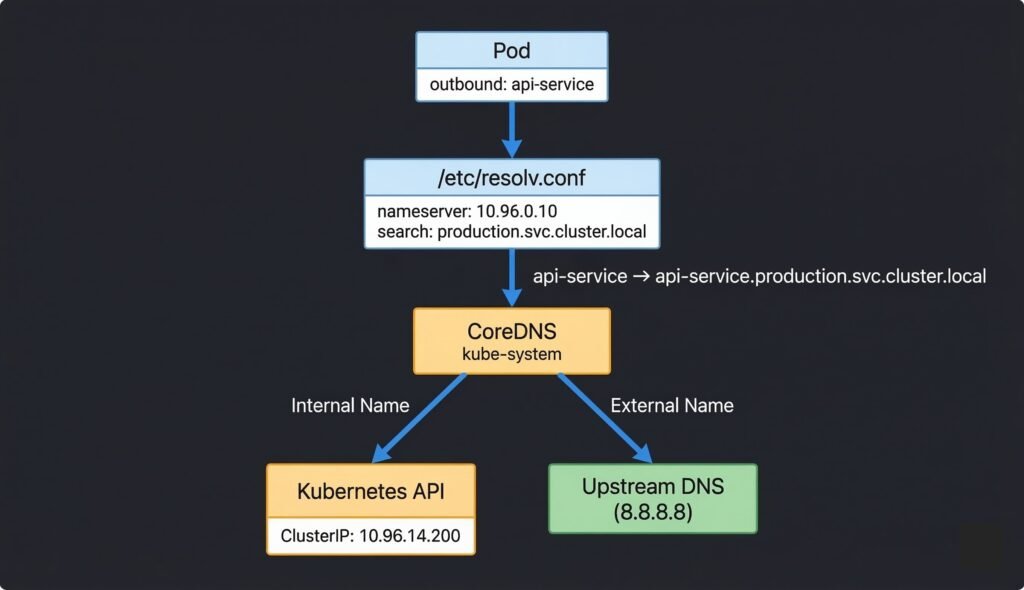
DIAGRAM: CoreDNS resolution flow — Pod at top sends query ‘api-service’. Arrow to /etc/resolv.conf box showing nameserver and search domains. Arrow to CoreDNS pods in kube-system namespace. CoreDNS branches: left branch for internal names queries Kubernetes API and returns ClusterIP. Right branch for external names forwards to upstream DNS (cloud provider or 8.8.8.8). Show the full FQDN expansion step.
DNS Name Formats
# Short name — works within the same namespace
api-service

# Namespace-qualified — works from any namespace
api-service.production

# Full FQDN — always works, no ambiguity
api-service.production.svc.cluster.local

# Headless service — returns pod IPs directly
kafka-0.kafka-headless.messaging.svc.cluster.local
The ndots:5 Performance Issue
The default options ndots:5 in pod DNS config means any name with fewer than 5 dots triggers multiple search domain lookups before trying the name as-is. A query for api.external.com generates 4–5 DNS queries before resolving. In high-throughput microservices this multiplies DNS load significantly.
# Use a trailing dot to force absolute lookup — skips search domains
curl http://api.external.com.    # single DNS query

# Or reduce ndots in pod spec
spec:
  dnsConfig:
    options:
    - name: ndots
      value: "2"
5. Ingress — Routing External Traffic
Services with type: LoadBalancer give you a public IP per service — expensive and unmanageable at scale. Ingress provides a single entry point for all external HTTP/HTTPS traffic with hostname and path-based routing.
External Traffic (HTTPS)
         │
         ▼
   Cloud Load Balancer (single public IP)
         │
         ▼
   Ingress Controller (nginx, Traefik, etc.)
         │
         ├── host: api.opscart.com  → api-service:8080
         ├── host: app.opscart.com  → frontend-service:3000
         └── host: metrics.opscart.com/prometheus → prometheus:9090
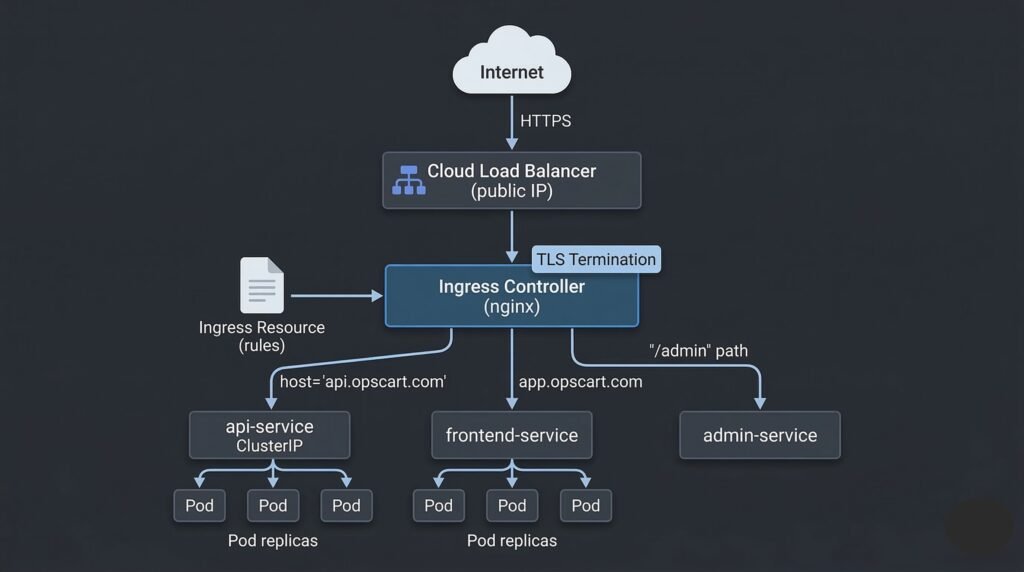
DIAGRAM: Ingress routing architecture — external HTTPS traffic enters through a Cloud Load Balancer. Arrow to Ingress Controller pod. Ingress Controller reads Ingress rules and routes based on hostname: api.opscart.com to api-service (ClusterIP), app.opscart.com to frontend-service, /admin path to admin-service. Show TLS termination happening at the Ingress Controller. Each backend Service connects to its pod endpoints below.
Ingress Resource Example
apiVersion: networking.k8s.io/v1
kind: Ingress
metadata:
  name: opscart-ingress
  namespace: production
  annotations:
    nginx.ingress.kubernetes.io/rewrite-target: /
    cert-manager.io/cluster-issuer: letsencrypt-prod
spec:
  tls:
  - hosts:
    - api.opscart.com
    secretName: api-tls-cert
  rules:
  - host: api.opscart.com
    http:
      paths:
      - path: /
        pathType: Prefix
        backend:
          service:
            name: api-service
            port:
              number: 8080
TLS with cert-manager
cert-manager automates TLS certificate provisioning from Let’s Encrypt (or other ACME providers). It watches for Ingress resources with the cert-manager.io/cluster-issuer annotation, requests a certificate, and stores it as a Kubernetes Secret that the Ingress controller reads.
# Check certificate status
kubectl get certificate -n production
# Ready: True = TLS is working

# Check if ACME challenge is stuck
kubectl get challenges -n production
# HTTP-01 challenge requires port 80 to be publicly reachable
6. NetworkPolicies — Controlling Traffic
By default, every pod in Kubernetes can communicate with every other pod. In production, this is too permissive. NetworkPolicies allow you to define rules about which pods can communicate with which other pods — at the IP and port level.
# Only allow the frontend pods to talk to the api pods on port 8080
apiVersion: networking.k8s.io/v1
kind: NetworkPolicy
metadata:
  name: allow-frontend-to-api
  namespace: production
spec:
  podSelector:
    matchLabels:
      app: api               # this policy applies to api pods
  ingress:
  - from:
    - podSelector:
        matchLabels:
          app: frontend      # only frontend pods can connect
    ports:
    - protocol: TCP
      port: 8080
The default-deny pattern — the most common production pattern is to deny all ingress and egress by default, then add explicit allow rules:
# Default deny all ingress and egress in a namespace
apiVersion: networking.k8s.io/v1
kind: NetworkPolicy
metadata:
  name: default-deny-all
  namespace: production
spec:
  podSelector: {}            # applies to all pods
  policyTypes:
  - Ingress
  - Egress
Critical gotcha: A default-deny egress policy blocks DNS (UDP/TCP port 53 to CoreDNS). Always add an explicit DNS egress rule immediately after a default-deny policy, or every pod in that namespace will lose DNS resolution and fail all service-to-service communication.
# Always add this alongside any default-deny egress policy
egress:
- ports:
  - protocol: UDP
    port: 53
  - protocol: TCP
    port: 53
7. Real Production Networking Example
A production microservices cluster on AKS with Azure CNI typically looks like this:
Azure VNet (10.0.0.0/8)
  │
  ├── AKS Subnet (10.240.0.0/16) ← node IPs
  │     Node 1: 10.240.0.4
  │     Node 2: 10.240.0.5
  │
  └── Pod Subnet (10.244.0.0/16) ← pod IPs (Azure CNI assigns from VNet)
        Pod A: 10.244.0.10       ← real Azure VNet IP, NSG-eligible
        Pod B: 10.244.1.10

Azure Load Balancer (public IP: 20.x.x.x)
  └── Ingress Controller (nginx)
        ├── api.opscart.com → api-service → pod replicas
        └── app.opscart.com → frontend-service → pod replicas

CoreDNS (ClusterIP: 10.96.0.10)
  └── Resolves internal names, forwards external queries to Azure DNS

Calico (CNI + NetworkPolicy enforcement)
  └── Enforces PCI namespace isolation policies
With Azure CNI, pod IPs are real Azure VNet IPs — you can apply Azure NSG rules directly to pod traffic, use Azure Firewall to inspect pod-to-internet traffic, and peer the cluster VNet with on-premises networks without additional configuration.
8. When Things Go Wrong
Pod cannot reach another pod by IP — CNI plugin is not routing cross-node traffic correctly. Check CNI plugin pods in kube-system and node network configuration. See: Debugging Kubernetes Networking and DNS
Service not reachable by name — DNS failure or Service selector mismatch. Run nslookup <service> from inside a pod. Check kubectl get endpoints <service>. See: Debugging Kubernetes DNS Issues
Ingress returns 503 — backend Service has no healthy endpoints. Check kubectl get endpoints for the backend Service. Check pod readiness probes. See: Production Kubernetes Debugging Handbook
DNS fails after applying NetworkPolicy — default-deny egress blocked port 53 to CoreDNS. Add DNS egress allowance immediately. See: Debugging Kubernetes DNS Issues
TLS certificate not provisioning — cert-manager ACME challenge failing. Check kubectl get challenges. HTTP-01 requires port 80 to be publicly reachable. See: Production Kubernetes Debugging Handbook
Quick Reference
# Test pod-to-pod connectivity
kubectl exec -it <pod> -- curl http://<pod-ip>:<port>

# Test Service reachability by ClusterIP
kubectl exec -it <pod> -- curl http://<cluster-ip>:<port>

# Test DNS resolution
kubectl exec -it <pod> -- nslookup kubernetes.default
kubectl exec -it <pod> -- nslookup <service>.<namespace>.svc.cluster.local

# Check Service endpoints
kubectl get endpoints <service-name> -n <namespace>

# Check Service selector vs pod labels
kubectl get svc <service> -o yaml | grep selector -A5
kubectl get pods --show-labels -n <namespace>

# Check CoreDNS pods
kubectl get pods -n kube-system -l k8s-app=kube-dns

# Check Ingress and its assigned address
kubectl get ingress -n <namespace>

# Check NetworkPolicies in a namespace
kubectl get networkpolicy -n <namespace>

# Check certificate status
kubectl get certificate -n <namespace>
Summary
Kubernetes networking is four layers working together:
- Pod networking (CNI) — every pod gets a unique IP, direct routing between pods on any node
- Services — stable ClusterIP and DNS name abstracting away ephemeral pod IPs, kube-proxy handles routing
- CoreDNS — internal DNS resolution for Services, proxies external queries to upstream DNS
- Ingress — single external entry point for HTTP/HTTPS with hostname and path routing, TLS termination
NetworkPolicies sit across all layers enforcing traffic rules. The most common production mistake is a default-deny egress policy that silently breaks DNS — always add port 53 egress allowance alongside any deny-all policy.
Continue learning: