Repo: All commands, scripts, and real terminal output from this article live at github.com/opscart/docker-sandbox-devops. Nothing in this article is invented. Every finding was captured from real runs on macOS Apple Silicon with
sbxv0.31.1.
The Problem No One Has Solved Cleanly
I manage eight AKS clusters for Fortune 500 clients. My laptop has Azure service principals, SSH keys, kubeconfig files with a dozen cluster contexts, and twenty-plus repos — some with .env files that include real API keys. When I run Claude Code to fix a deployment issue, the agent inherits all of it. My production cluster contexts. Everything on the machine.
Docker’s own developer advocate published a detailed breakdown of what goes wrong when AI coding agents run with no guardrails — database wipes, home directory deletions, a thirteen-hour AWS production outage caused by Amazon’s own Kiro agent. The security case is documented and real. What that article doesn’t cover is what the isolation actually looks like when you probe it with real commands. What can the agent see? What can’t it reach? How do API calls work if the key is never in the environment?
That’s what this article is. Five labs, a real Kubernetes debugging scenario, two ways to connect a cluster, and a detailed isolation proof — every claim backed by real terminal output.
Test Methodology
Before the findings — what was actually tested:
| What | Detail |
|---|---|
| sbx version | v0.31.1 · commit e658be1 |
| Host | macOS Apple Silicon |
| Network endpoints probed | 13 across allowed, blocked, and edge cases |
| Labs completed | 5 (install, network policy, isolation, parallel agents, DevOps workloads) |
| Isolation probes | 7 targeted commands against the sandbox boundary |
| Kubernetes scenario | Real agent task — broken deployment, two bugs, timed |
| Template | shamsk22/sbx-devops-toolkit:v1.1.0 (kubectl, helm, kustomize, k3d, azure-cli) |
Everything verified live. No simulated output. The repo has the raw terminal captures for every lab.
The Most Interesting Finding First
Before the architecture overview, before the network probe matrix — the single most interesting thing this evaluation found:
The AI agent made authenticated Anthropic API calls throughout the entire session. The API key was never in the sandbox environment.
env | grep -iE "anthropic|api_key|secret|token|password"
# (empty)
Empty. The agent called api.anthropic.com, received responses, reasoned about Kubernetes manifests, wrote code — all without the key being anywhere in the environment it could read, copy, or exfiltrate.
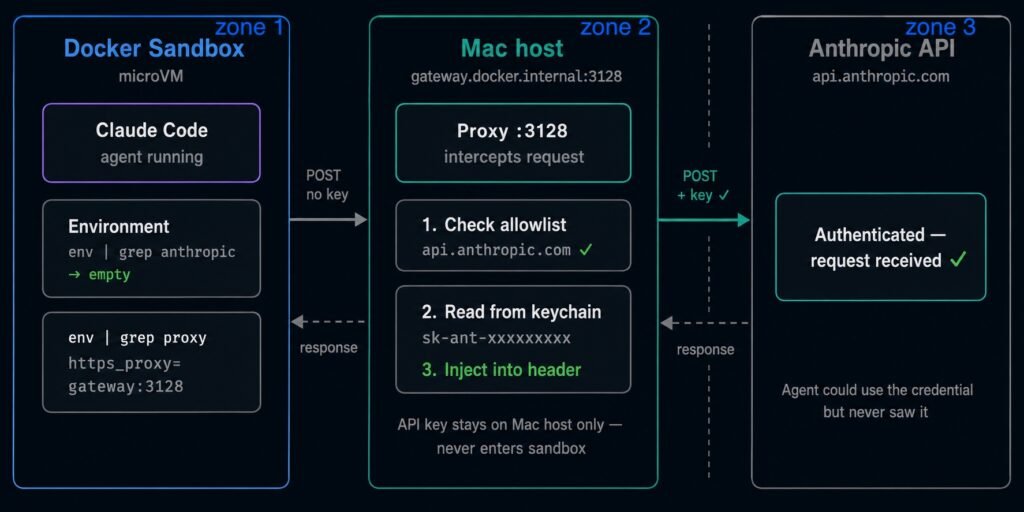
Proxy credential injection flow: the agent sends a request with no Authorization header. The host-side proxy reads the API key from the Mac keychain, injects it as a header, then forwards the authenticated request to api.anthropic.com. The key never enters the microVM.
Every outbound request from the sandbox routes through a proxy at gateway.docker.internal:3128 on the Mac host:
env | grep proxy
# https_proxy=http://gateway.docker.internal:3128
# http_proxy=http://gateway.docker.internal:3128
# JAVA_TOOL_OPTIONS=-Dhttp.proxyHost=gateway.docker.internal ...
The agent sends a POST to api.anthropic.com with no Authorization header — because it doesn’t have the key. The proxy intercepts it, checks that api.anthropic.com is on the allowlist, reads the API key from the Mac keychain (a secure encrypted store on the host, completely outside the microVM), adds Authorization: Bearer sk-ant-xxx to the header, and forwards the authenticated request to Anthropic.
Think of it like an OAuth gateway. The proxy holds the credential and vouches for the agent’s requests. The agent gets access without ever possessing the key. You cannot steal what you never had.
This is architecturally different from how most developers run agents today — where ANTHROPIC_API_KEY sits in the shell environment, one echo $ANTHROPIC_API_KEY away from being exfiltrated.
What Docker Sandbox Actually Is
Docker Sandbox runs AI coding agents — Claude Code, Codex, Gemini CLI, Copilot CLI, Kiro — inside microVMs on your local machine. The CLI is sbx, installed separately from Docker Desktop. Each sandbox gets its own Linux kernel, its own Docker daemon, its own network stack, and a host-side proxy that mediates all outbound HTTP/HTTPS traffic.
The critical architectural difference from a Docker container: a container shares the host kernel. A kernel exploit inside a container can reach the host. A microVM has its own kernel — the isolation boundary is hardware-enforced. Docker built a custom VMM rather than using Firecracker specifically because Firecracker is Linux-only. The sbx microVM runs natively on macOS, Windows, and Linux with the same isolation model across all platforms.
Docker Sandbox is marked Experimental in current documentation. Free for individuals. The CLI surface is actively developed — v0.31.1 introduced --clone mode, removed the network policy prompt from login, and renamed the policy tiers. Everything here is verified against sbx v0.31.1 — see the repo’s tested-with.md for the exact versions under which each lab was verified.
Architecture: Four Isolation Layers
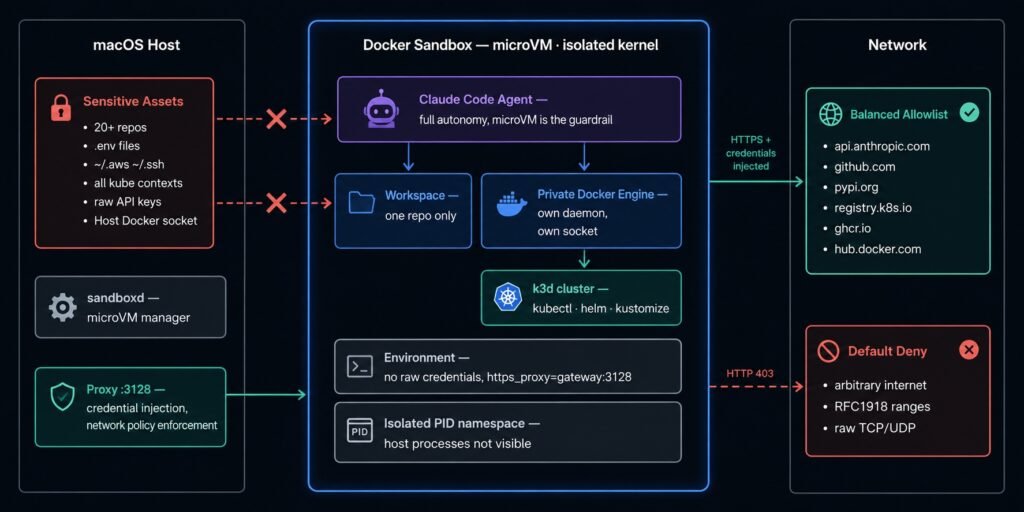
Architecture diagram: macOS host with sensitive assets on the left, Docker Sandbox microVM in the center, network policy zones on the right. The proxy is the only permitted path between the sandbox and the external network.
Every sandbox stacks four isolation layers:
1. Hypervisor isolation. Separate Linux kernel per sandbox. Host processes invisible from inside. Other sandboxes invisible. A compromised sandbox cannot escalate to the host kernel.
2. Network isolation. All outbound HTTP/HTTPS routes through a host-side proxy at gateway.docker.internal:3128. Raw TCP, UDP, and ICMP are blocked at the network layer. The proxy enforces the active network policy — allow-all (all HTTP/HTTPS permitted), balanced (default deny with a curated dev allowlist), or deny-all (all blocked unless explicitly permitted). Set the policy before starting your first sandbox:
sbx policy set-default balanced3. Docker Engine isolation. Each sandbox runs a private Docker Engine. The Docker socket inside the sandbox is the sandbox’s own socket, created at sandbox start. There is no path to the host Docker daemon. An agent can run docker build, docker run, and docker compose without socket mounting or host privilege escalation.
4. Credential isolation. Raw API keys are not injected into the sandbox environment. The proxy holds credentials on the host side and injects them into outbound HTTP headers at the proxy layer — the agent’s requests work, but the key never enters the microVM. As shown above, this holds under direct adversarial probing.
Lab Results: What the Documentation Doesn’t Tell You
Network Policy — Three Findings
I ran a probe matrix against the Balanced policy across thirteen endpoints. The full methodology and raw output are in labs/02-network-policy-probes/.
Finding 1: Blocking is HTTP 403, not TCP rejection.
Every blocked endpoint returned exit=0 with http=403:
probe "example.com" "https://example.com"
# example.com | exit=0 | http=403

probe "192.168.1.1" "http://192.168.1.1"
# 192.168.1.1 | exit=0 | http=403
The proxy intercepts and returns 403 directly. The exit code is 0 — the curl command succeeded. An agent that retries on 403 will retry blocked requests indefinitely. It cannot distinguish a blocked domain from a legitimate server-side 403 by exit code alone. For DevOps workflows this matters — an agent that hits a blocked registry will keep retrying silently rather than failing fast.
Finding 2: HTTP CONNECT tunneling allows raw TCP to allowed hosts on any port.
The Balanced policy is hostname-scoped, not protocol+port-scoped. github.com is on the allowlist — and HTTP CONNECT permits a tunnel to it on any port:
curl -s --max-time 3 telnet://github.com:22
# github:22 | connected
The proxy sees github.com on the allowlist and permits the CONNECT tunnel on port 22. An agent can SSH to any allowed domain from inside a Balanced sandbox. The policy is a hostname filter, not a full network control plane.
Finding 3: DNS is not policy-filtered.
Official Docker documentation states “the sandbox cannot make raw DNS queries.” Lab results contradict this:
dig example.com +short
# 172.66.147.243

dig google.com +short
# 142.250.80.46
Both a blocked and an allowed domain resolved. The microVM has an internal stub resolver that forwards DNS independently of the HTTP proxy policy. An agent can resolve any hostname regardless of the active policy tier. DNS cannot serve as a secondary enforcement layer.
Isolation Verification — Seven Proof Points
Seven targeted probes against the sandbox boundary — run immediately after the AI agent completed the Kubernetes debugging scenario to show exactly what the agent could and couldn’t access during the entire run.
Proof 1 — Filesystem boundary.
ls /Users/opscart/
# Source

ls /Users/opscart/.ssh/ 2>&1
# ls: cannot access '/Users/opscart/.ssh/': No such file or directory
One directory visible — the mounted workspace. Parent directories are read-only stubs with no siblings. SSH keys, other repos, credentials directories — none of them exist inside the sandbox.
One important implication: if your workspace directory is your home directory (~/), your entire home is visible and writable inside the sandbox. Always mount a project subdirectory.
Proof 2 — Credentials not in environment.
env | grep -iE "anthropic|api_key|aws|secret|token|password"
# (empty)
As shown earlier in this article — no raw credentials anywhere in the environment. The agent made authenticated API calls throughout the session. The key was never here.
Proof 3 — Proxy architecture confirms credential injection.
env | grep proxy
# https_proxy=http://gateway.docker.internal:3128
# http_proxy=http://gateway.docker.internal:3128
# JAVA_TOOL_OPTIONS=-Dhttp.proxyHost=gateway.docker.internal -Dhttp.proxyPort=3128 ...
# no_proxy=localhost,127.0.0.1,::1,[::1],gateway.docker.internal
Every outbound request routes through the host proxy. The proxy address is visible. The credentials it carries are not. This is the mechanism described at the top of this article — confirmed live inside the running sandbox.
Proof 4 — Process namespace.
ps aux | wc -l
# 13
A macOS host runs hundreds of processes. The sandbox shows 13 — all sandbox-internal. The process table reveals the internal stack including dockerd, containerd, socat bridging SSH agent forwarding, and the coding agent itself. Host processes are completely invisible. No way to inspect, interact with, or kill anything running on the host.
Proof 5 — Private Docker Engine.
docker info | grep -E "Server Version|Operating System|ID"
# Server Version: 29.4.3
# Operating System: Ubuntu 25.10 (containerized)
# ID: e6934b23-368c-4259-a873-96f879f587e5
Ubuntu 25.10. A unique daemon ID. Not the host Docker. The agent ran kubectl, built containers, deployed a full Kubernetes cluster — all against this private daemon. No path to the host Docker socket from inside the sandbox.
Proof 6 — Host services unreachable via localhost.
curl -s --max-time 3 https://localhost:6443 2>&1 || echo "blocked"
# curl: (7) Failed to connect to localhost port 6443: Connection refused
Port 6443 is the standard Kubernetes API server port — my minikube cluster listens there on the Mac host. From inside the sandbox, localhost is the sandbox’s own loopback. Host services are unreachable by default. My eight AKS contexts, my minikube, every cluster on the host — invisible from inside the sandbox unless explicitly permitted via a network policy rule.
Proof 7 — What the agent had vs what it didn’t.
During the entire debugging session the agent had full access to one project directory, kubectl access to the k3d cluster running inside the sandbox, and full Docker capabilities against the private daemon.
The agent could not access any other directory on the host, SSH keys or cloud credentials, other kubeconfig contexts, the host Docker daemon, any cluster not running inside the sandbox, or raw API credentials of any kind.
An agent running directly on the developer’s machine would have had unrestricted access to all of the above.
The –clone Mode: Stronger Filesystem Isolation
v0.31.1 introduced --clone as an alternative to --branch. The difference matters for isolation:
--branch creates a Git worktree inside the sandbox — the host repo is writable, changes appear on the host immediately. --clone creates a full Git clone inside the container. The host repo is mounted read-only at /run/sandbox/source. The agent cannot write to your host filesystem directly.
sbx run claude --name my-agent --clone
# Workspace: /Users/opscart/Source/my-project (in-container clone)
# Source (RO): /Users/opscart/Source/my-project -> /run/sandbox/source
# Remote: sandbox-my-agent
Changes the agent makes stay inside the container until you explicitly pull them:
git fetch sandbox-my-agent
git branch my-feature refs/sandboxes/my-agent/<branch>
One important warning: on sbx rm, any commits not fetched first are lost. Docker shows this warning before deletion.
--branch | --clone | |
|---|---|---|
| Host repo | Read-write via worktree | Read-only |
| Changes on host | Immediately visible | Only after git fetch |
Risk on sbx rm | None — files stay on host | Commits lost unless fetched |
| Use case | Iterative, collaborative | Isolated, review before merge |
For maximum filesystem isolation — where the agent cannot modify your host files under any circumstances — use --clone.
The –branch Mode Reality
--branch is still available and documented. But its isolation model is commonly misunderstood.
The assumption: two agents with --branch create two separate microVMs — full VM-level isolation between them.
The reality: both agents run inside one sandbox — one microVM, one Docker daemon, one network stack. The isolation is Git-level only: separate branches, separate worktrees. Confirmed from lab output — Agent B attached to the existing 04-agent-a sandbox when launched from the same directory.
For true VM-level agent isolation — separate credentials, separate network policies, separate Docker daemons — use separate workspace directories. Each directory gets its own sandbox and its own microVM.
Running Kubernetes Inside a Docker Sandbox
The sandbox has a private Docker daemon. In theory, you can run k3d inside it. In practice, standard k3d cluster create hangs indefinitely. Three root causes, all undocumented:
Root cause 1: /dev/kmsg is missing. The microVM kernel doesn’t expose it. k3s kubelet requires it at startup. Fix: --volume /dev/null:/dev/kmsg@all
Root cause 2: VXLAN is unsupported. The sandbox kernel has no vxlan module. Flannel’s default backend fails. Fix: --k3s-arg "--flannel-backend=host-gw@server:0"
Root cause 3: kubectl routes through the proxy. The kubeconfig points to https://0.0.0.0:<port>. Without 0.0.0.0 in NO_PROXY, kubectl routes API calls through the sandbox proxy which rejects them. Fix: export NO_PROXY=${NO_PROXY},0.0.0.0
The working command with all three fixes:
k3d cluster create dev-cluster \
  --no-lb \
  --volume /dev/null:/dev/kmsg@all \
  --k3s-arg "--flannel-backend=host-gw@server:0" \
  --env "HTTP_PROXY=http://gateway.docker.internal:3128@all:*" \
  --env "HTTPS_PROXY=http://gateway.docker.internal:3128@all:*" \
  --env "NO_PROXY=localhost,127.0.0.1,::1,gateway.docker.internal@all:*" \
  --wait \
  --timeout 5m0s
After running: node Ready in 5 seconds (after initial image pull is cached). The entire cluster runs inside the sandbox’s private Docker daemon — destroy the sandbox and the cluster is gone.
This is wrapped in scripts/k3d-create-sbx.sh in the repo. For connecting to an external cluster instead, see the full repo documentation — two network policy rules are required (not one), and the policy CLI syntax has a non-obvious gotcha: sbx policy deny does not remove an allow rule.
The Real Use Case: AI Agent Fixes a Broken Kubernetes Deployment
The scenario: a payments-service deployment is failing in the development cluster. The agent receives a task file and a set of manifests. No other context.
sbx run claude \
  --template shamsk22/sbx-devops-toolkit:v1.1.0 \
  --name kubernetes-debugging

bash scripts/k3d-create-sbx.sh

export KUBECONFIG=/home/agent/.config/k3d/kubeconfig-dev-cluster.yaml
export NO_PROXY=${NO_PROXY},0.0.0.0
bash scripts/reset-demo.sh
The agent completed the task in under five minutes and found two bugs — one planted, one discovered independently.
Bug 1 (planted): Memory limits set to 64Mi. The service needs ~150Mi at peak. Any real traffic spike triggered OOMKill.
# Before → After
memory requests: 64Mi → 128Mi
memory limits:   64Mi → 256Mi
Bug 2 (found independently): Health check probes targeting port 8080 with paths /healthz and /ready on an nginx container that serves on port 80 with only /. The task said nothing about probes. The agent read the manifest, identified the mismatch, and fixed both probes and the service’s targetPort without being told to look there. This is the kind of reasoning that makes AI agents genuinely useful for infrastructure debugging — it didn’t just follow instructions, it read the actual state.
Result: both pods 1/1 Running, 0 restarts.
All seven isolation proof points were verified immediately after — throughout the entire debugging session, the agent operated within its boundary without exception.
Cleanup:
k3d cluster delete dev-cluster
exit
sbx rm kubernetes-debugging
# Everything gone. Host machine exactly as before.
Honest Assessment
What Docker Sandbox does well:
The private Docker Engine per sandbox is the most significant capability for DevOps workflows. Coding agents routinely need to build and run containers. A plain Docker container forces socket mounting — which defeats isolation entirely. Docker Sandbox gives each sandbox its own daemon. The agent gets full Docker capabilities without any path to the host.
The credential injection model is architecturally clean. The proxy holds API keys on the Mac host and injects them at the network layer. An agent that is fully compromised inside the sandbox cannot exfiltrate raw credentials — they were never in the environment. The agent can make authenticated API calls; it cannot discover what key is being used.
The cross-platform VMM means identical isolation on macOS, Windows, and Linux. No platform-specific workarounds required.
Where friction lives:
The image iteration cycle is slow — every tool addition requires docker build, push, and sandbox recreation. For stable toolchains this is acceptable. For rapid experimentation it is not.
k3d inside the sandbox works but requires three undocumented fixes. The /dev/kmsg and VXLAN issues are kernel capability gaps that took real troubleshooting to identify.
The --branch mode is Git isolation not VM isolation. This distinction matters for threat models requiring separate credentials or network policies per agent.
The network policy CLI has non-obvious syntax in several places — sbx policy deny does not remove an allow rule, external cluster access requires two policy rules not one, and the proxy resolves host.docker.internal to localhost internally when applying policy.
Status note:
Docker Sandbox is marked Experimental. The CLI is actively developed and breaking changes happen between minor versions — v0.31.1 changed login flow, added --clone, and renamed policy tiers. The isolation model is sound. The CLI ergonomics are still being shaped.
Where It Fits — and Where It Doesn’t
Docker Sandbox fits well for local coding agent safety when a developer has multiple projects and credentials on one machine, for DevOps engineers running agents against development or staging infrastructure, and for demo and experimentation environments where full teardown is the desired cleanup.
It does not replace cloud-hosted sandbox platforms (E2B, Modal, Daytona, Cloudflare Sandboxes) — those solve agent code execution at remote scale. Docker Sandbox is local. These are different problem spaces.
Conclusion
The isolation proof is not marketing. It held under real adversarial probing. Seven commands, seven verified claims — one directory visible, no credentials in environment, no host processes, no host clusters, no host Docker daemon.
The credential injection finding is the most important architectural detail: the agent made authenticated API calls throughout the session without the key ever entering the sandbox. The proxy on the Mac host read the key from the keychain and injected it at the network layer. The agent could use the credential — it could never see, copy, or exfiltrate it.
The network policy findings add important nuance that the documentation glosses over. The --branch mode reality is different from what most people assume. k3d works inside the sandbox but required three specific undocumented fixes.
The full repo — five labs, both Kubernetes connection patterns, working scripts, architecture notes, threat model, and a live friction log updated throughout this evaluation — is at github.com/opscart/docker-sandbox-devops.
Docker Sandbox is Experimental. It is already the most practical local isolation option for DevOps engineers running AI coding agents against real infrastructure. Use it with that understanding.