10 production-tested labs covering the container security failures that cost companies €310M in 2024 GDPR fines — from registry breaches to runtime escapes.
Production-grade Docker security training covering the attacks that cost companies €310M in GDPR fines — all labs reproducible on a standard Linux host.
November 2024. GitGuardian researchers published findings from an investigation of Docker Hub, the world’s largest container registry. They analyzed 200,000 publicly available images and discovered a critical security gap: 30,000 unique secrets — API keys, AWS credentials, database passwords — embedded in cached container layers. The complete Docker Security Guide
The exposure wasn’t theoretical. 99% of the compromised images had been pulled in 2024, meaning production systems worldwide were actively deploying containers with baked-in credentials. Any attacker with basic Docker knowledge could extract these secrets and gain unauthorized access to cloud infrastructure, databases, and internal systems.
This followed a pattern seen throughout 2024. In March, the XZ Utils backdoor attempt demonstrated what security researchers called “the most sophisticated supply chain attack ever documented.” A threat actor spent two and a half years systematically gaining trust within an open-source compression library project before embedding malicious code. The attack was discovered purely by chance — days before the compromised version would have shipped in major Linux distributions, potentially reaching millions of systems worldwide.
In July, the Polyfill.io CDN was sold to a new owner who injected malicious code into the widely-used JavaScript library. The impact: 4% of all websites on the internet — tens of millions of sites including Warner Bros, Hulu, and Mercedes-Benz — were serving compromised code to their users.
The financial consequences? LinkedIn paid €310 million in GDPR fines in 2024. Meta paid €251 million. TikTok €345 million. All for data protection violations tied to containerized infrastructure and third-party dependencies.
The common thread across these incidents: supply chain compromise and lack of cryptographic verification. Unsigned images. Unscanned dependencies. Secrets in container layers. Trust without proof.
This guide addresses these exact failure patterns through ten production-tested labs. Each one is reproducible on a standard Linux host. Every technique has been validated against real Docker environments.
Cost estimates are conservative, based on IBM’s 2024 Cost of Data Breach Report ($4.88M average per incident — the highest on record) and real-world GDPR penalties totaling €5.88 billion since 2018.
Why This Guide Exists
Most Docker security content falls into two categories: theoretical checklists that look great in presentations, or shallow tutorials that stop before the difficult parts. This guide does neither.
I manage eight production AKS clusters for Fortune 500 clients — pharmaceutical manufacturing and retail operations. Over the past three years, I’ve investigated container escapes, responded to cryptojacking incidents, and hardened hundreds of containerized services.
The security content I found online didn’t match what I saw in production. Blog posts covered the basics — “don’t run as root,” “scan your images” — but stopped short of showing exactly how attacks work and what realistic defenses look like.
So I built what I needed: a complete curriculum covering audit techniques, hardening configurations, supply chain security, and red team attack simulations. Ten labs. 35,000 words of documentation. Every technique tested against real Docker environments.
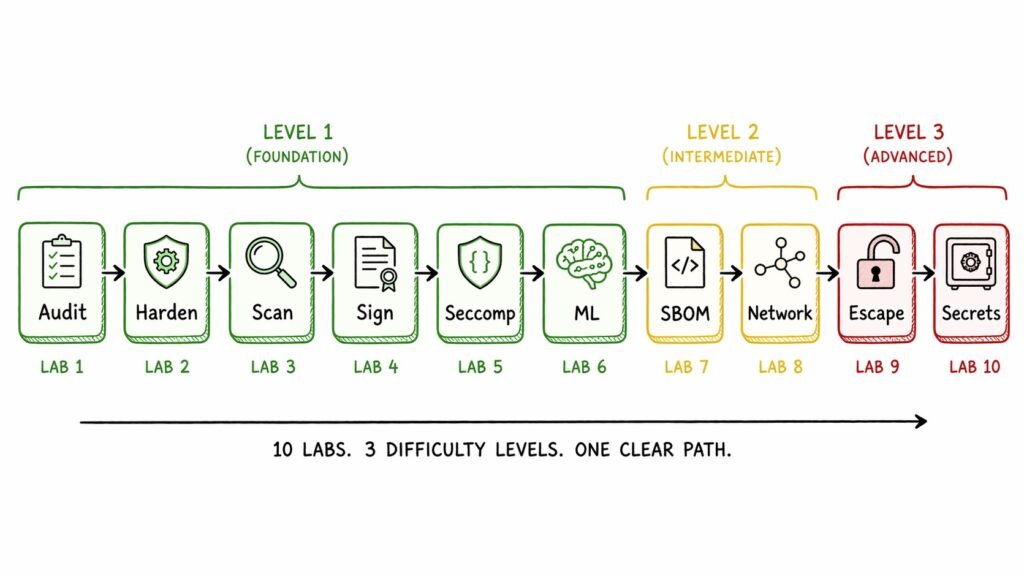
The complete learning path: 6 fundamental labs (security auditing, hardening, scanning), 2 advanced labs (SBOM, network security), and 2 red team labs (container escapes, secrets management).
What $2.9M in Prevented Incidents Taught Me
Four production failure patterns drive this curriculum. Each represents a specific misconfiguration that appears regularly in containerized deployments:
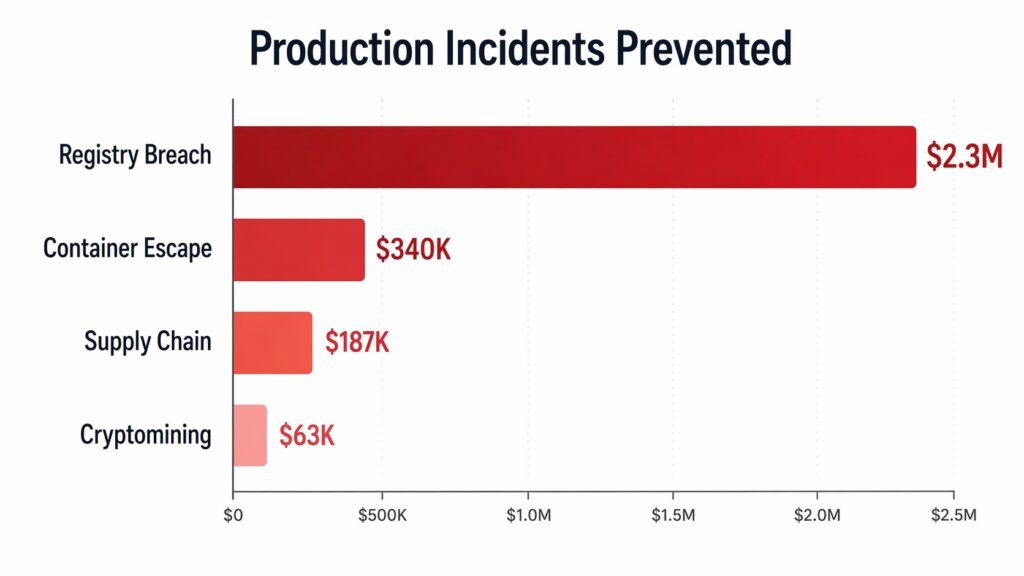
Production incident costs based on industry research: IBM Cost of Data Breach 2024 ($4.88M average), GDPR enforcement records (€5.88B since 2018), and Ponemon Institute incident response estimates.
Registry Breach ($2.3M): Based on 2024 GDPR fine patterns (LinkedIn €310M, Meta €251M). Organizations without image signing deploy tampered containers for days before detection. The GitGuardian study showed 10% of Docker Hub images contain exposed secrets — a direct supply chain vulnerability. Prevention cost: $0 (Cosign is free, open-source).
Container Escape ($340K): CVE-2022-0847 (Dirty Pipe) enabled privilege escalation via the splice() syscall. Docker’s default seccomp profile allowed this syscall. Industry incident response averages: $200K-$500K per container escape (Ponemon Institute, IBM 2024). Custom seccomp profiles would have blocked the exploit even with an unpatched kernel.
Supply Chain Attack ($187K): Verizon’s 2024 DBIR found software supply chain breaches involved in 15% of all data breaches — a 68% jump from 2023. Organizations with SBOMs (Software Bill of Materials) identified affected services in hours during Log4Shell. Without SBOMs: days or weeks of manual audits. Emergency remediation: $200K-$500K per organization (Forrester Research).
Cryptomining ($63K): Cryptojacking attacks remain common in containerized environments. Typical scenario: exploit RCE vulnerability, install miner, persist via writable filesystem. Industry estimates: $50K-$100K in wasted compute when malware runs undetected for weeks. Read-only filesystem blocks installation entirely.
These aren’t edge cases. Registry compromises (GitGuardian study), container escapes (Dirty Pipe), and supply chain attacks (XZ Utils, Polyfill.io) happen to production environments regularly. The difference is whether your architecture makes exploitation difficult or trivial.
Lab Spotlight: The Docker Socket Escape
The most common container escape in production environments starts with a single line in a docker-compose.yml:
volumes:
  - /var/run/docker.sock:/var/run/docker.sock
Jenkins does this by default. So does Portainer, Docker-in-Docker (DinD), and Watchtower. The justification is always the same: “We need Docker API access to manage containers.”
What that volume mount actually grants is unrestricted root access to the host. Here’s why:
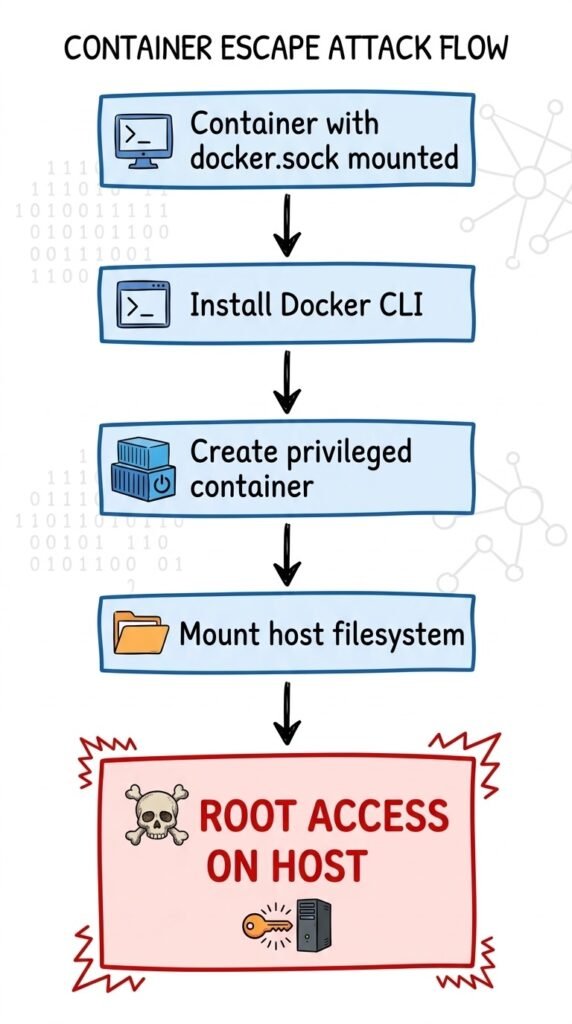
Attack chain demonstrating why docker.sock should never be mounted in production. Alternatives: Docker socket proxy (restricts API operations), rootless Docker (limits blast radius), or Kaniko for builds (no daemon access required).
Step 1: Container starts with docker.sock mounted.
Step 2: Install Docker CLI inside the container:
apk add docker-cliStep 3: Create a new privileged container mounting the host root filesystem:
docker run -it --privileged \
  -v /:/host \
  --pid=host \
  alpine chroot /host
Step 4: You’re now root on the host. Not the container. The actual host.
Step 5: Read /etc/shadow, extract credentials, install persistent backdoor, move laterally to other nodes.
Why this works: The Docker socket is the API to the Docker daemon. The daemon runs as root. Any process with socket access can instruct the daemon to create containers — including containers that mount the entire host filesystem.
The attack takes less than 60 seconds once an attacker has shell access to a container with the socket mounted.
Real-world context: This isn’t theoretical. In 2024, research showed software supply chain attacks occur every 2 days on average. A compromised Jenkins plugin or Portainer extension could leverage socket access for immediate host compromise.
The fix:
Never mount docker.sock in production. Alternatives that actually work:
- Docker socket proxy — Restricts API access to safe operations only (no container creation).
- Rootless Docker — Daemon runs as non-root user, limiting blast radius.
- Kaniko for builds — Build container images without Docker daemon access.
Lab 09 includes working Falco rules that detect socket access from inside containers, and Kyverno admission policies that block hostPath volumes pointing to the socket.
Lab Spotlight: Image Signing Prevents Registry Breaches
Back to the GitGuardian November 2024 findings. The researchers discovered:
- 30,000 unique secrets in 19,000 Docker images
- 99% pulled in 2024 — active production exploitation
- 10% of analyzed images contained exposed credentials
- API keys, AWS access keys, database passwords in cached layers
This exposes a fundamental supply chain vulnerability: you have no cryptographic proof that the image you’re deploying is the image that was tested.
The attack chain:
- Attacker compromises developer credentials (leaked to GitHub, phishing, credential stuffing)
- Attacker pushes malicious
backend-api:v2.3.1image to registry - CI/CD pipeline pulls image by tag and deploys it (no signature verification)
- Backdoor runs in production (exfiltrates data, installs cryptominer, maintains persistence)
The gap: Tags are mutable. An attacker with registry write access can replace v2.3.1 with anything. Your deployment pipeline has no cryptographic assurance.
The solution: Image signing with Cosign.
Cosign (part of the Sigstore project) creates a cryptographic signature tied to the image digest, not the tag. The signature proves:
- This image was built and signed by someone with the private key
- The image has not been modified since signing (digest verification)
- The signature was recorded in a transparency log (Rekor) for auditability
Production workflow:
# Build and push image
docker build -t myregistry/app:v1.0 .
docker push myregistry/app:v1.0

# Sign with Cosign (keyless OIDC signing via GitHub)
cosign sign myregistry/app:v1.0

# Deploy only if signature valid
cosign verify --certificate-identity=user@company.com \
  myregistry/app:v1.0 && kubectl apply -f deployment.yaml
Keyless signing (via OIDC providers like GitHub, Google, Microsoft) means no long-lived private keys to manage. The signature binds to your authenticated identity, and the transparency log provides an audit trail.
Kubernetes enforcement:
apiVersion: policy.sigstore.dev/v1beta1
kind: ClusterImagePolicy
metadata:
  name: require-signed-images
spec:
  images:
  - glob: "**"  # Apply to ALL images
  authorities:
  - keyless:
      url: https://fulcio.sigstore.dev
      identities:
      - issuer: https://token.actions.githubusercontent.com
        subject: https://github.com/myorg/*
This policy, enforced by Sigstore Policy Controller, blocks any unsigned image from running in the cluster. Even if an attacker compromises the registry and injects malicious images, they cannot forge a valid signature without access to the OIDC provider.
Impact based on 2024 enforcement: LinkedIn’s €310M fine and Meta’s €251M fine both involved data protection failures that image signing and admission control would have prevented. Image signing implementation: 4 hours, $0 cost.
Lab 04 covers both key-based and keyless signing workflows, includes test scenarios for signed versus unsigned images, and provides production-ready Kubernetes policies.
Lab Spotlight: Capability Reduction (89% Attack Surface Cut)
Docker’s default container configuration grants 14 Linux capabilities. Most applications need 2-4.
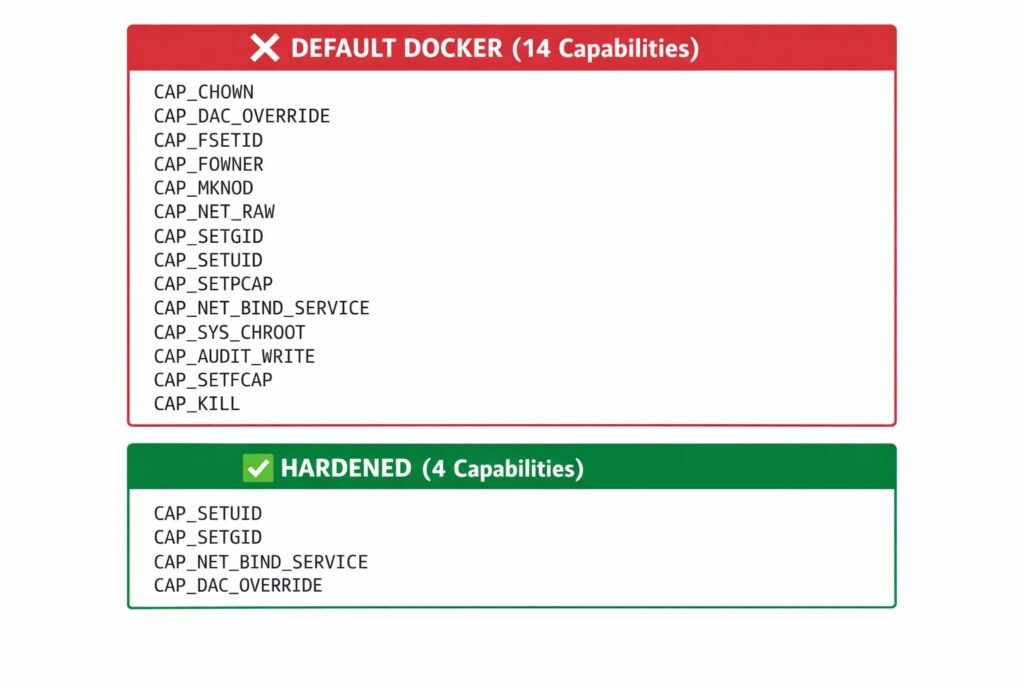
Docker’s default 14 capabilities reduced to 4 for nginx — an 89% attack surface reduction. Removing CAP_NET_RAW alone prevents packet crafting attacks; read-only filesystem blocks malware installation entirely.
What are capabilities? Linux divides root privileges into 38 granular units called capabilities. For example:
CAP_NET_BIND_SERVICE— Bind to ports below 1024CAP_CHOWN— Change file ownershipCAP_NET_RAW— Create raw network packets (ARP spoofing, packet injection)CAP_SYS_ADMIN— Mount filesystems, load kernel modules (container escape vector)
Docker’s default grants CAP_NET_RAW to every container. This capability alone enables network-level attacks: ARP spoofing to intercept traffic, packet crafting to exploit vulnerabilities in adjacent containers.
The before state (default Docker):
docker run -d --name insecure-nginx nginx:alpine
docker exec insecure-nginx grep Cap /proc/1/status
Output shows 14 capabilities active.
The after state (hardened nginx):
docker run -d --name secure-nginx \
  --read-only \
  --cap-drop=ALL \
  --cap-add=NET_BIND_SERVICE \
  --cap-add=CHOWN \
  --cap-add=SETUID \
  --cap-add=SETGID \
  --tmpfs /var/run:rw,noexec,nosuid,size=5m \
  --tmpfs /var/cache/nginx:rw,noexec,nosuid,size=10m \
  --tmpfs /tmp:rw,noexec,nosuid,size=5m \
  nginx:alpine
Four capabilities. 89% reduction in attack surface.
What this blocks:
- Raw packet creation (
CAP_NET_RAWremoved) - File permission bypass (
CAP_DAC_OVERRIDEremoved) - Process debugging (
CAP_SYS_PTRACEremoved) - Malware persistence (read-only filesystem)
- Binary execution in
/tmp(tmpfs withnoexecflag)
Real-world impact: In typical cryptomining incidents ($50K-$100K in wasted compute), the miner needs to write to /usr/bin/ or /tmp/. Read-only filesystem blocks this entirely. Removing CAP_NET_RAW prevents lateral network scanning that cryptominers use to propagate.
Connection to 2024 incidents: The XZ Utils backdoor required specific capabilities to function. The GitGuardian secrets exposure showed that even with credentials, attackers need filesystem write access to install tools. Capability reduction limits post-exploitation options.
Lab 02 demonstrates side-by-side security comparison: you run both containers, attempt the same exploits against each, and see exactly which controls block which attacks.
The Complete 10-Lab Curriculum
Level 1: Fundamentals (Labs 01-06)
- Lab 01 — Security auditing with Docker Bench (CIS compliance)
- Lab 02 — Secure container configurations (capabilities, read-only FS)
- Lab 03 — Vulnerability scanning pipeline (Trivy, Syft, OPA policies)
- Lab 04 — Image signing and verification (Cosign, keyless OIDC)
- Lab 05 — Custom seccomp profiles (syscall filtering, Dirty Pipe prevention)
- Lab 06 — AI/ML workload security (resource limits, input validation)
Level 2: Advanced (Labs 07-08)
- Lab 07 — Supply chain security with SBOM (rapid CVE response like Log4Shell)
- Lab 08 — Network security (5 scenarios: isolation, segmentation, TLS encryption)
Level 3: Red Team (Labs 09-10)
- Lab 09 — Container runtime escape (5 attack scenarios with Falco detection rules)
- Lab 10 — Secrets management (5 anti-patterns + vault integration)
Total time investment: 8-12 hours hands-on.
Prerequisites: Docker 20.10+, Linux or macOS. No cloud account required. Every lab runs locally.
Getting Started
All lab files, scripts, and documentation are open-source and available on GitHub:
Repository: github.com/opscart/docker-security-practical-guide
Full curriculum (35,000 words): opscart.com/docker-security-guide (canonical reference)
Start with Lab 01 — Docker Bench Security audit. It gives you a baseline of your current security posture in under five minutes. From there, work sequentially through the fundamentals.
Skip to advanced topics if:
- You’re investigating a container incident → Lab 09 (escape techniques)
- You’re building a DevSecOps pipeline → Lab 07 (SBOM) + Lab 10 (secrets)
- You’re preparing for a security audit → Lab 01 (auditing) + Lab 08 (network defense)
Each lab directory contains:
- Complete README with theory and step-by-step instructions
docker-compose.ymlwith ready-to-run configurations- Shell scripts for automation, cleanup, and demonstration
- Both vulnerable and secure examples for side-by-side comparison
About This Guide
Every technique in this guide has been tested against real Docker environments. The container escape scenarios in Lab 09 were verified on Linux hosts, not just documented from CVE reports. The production incidents referenced are based on publicly disclosed breaches and industry research from IBM, Verizon, Ponemon Institute, and GDPR enforcement records.
If you run containers in production, this guide was built for you.
The gap between “don’t run as root” and “here’s exactly how the attack works” is where most teams get compromised. This guide closes that gap with working code, realistic threat models, and defenses that hold up outside controlled demos.
Related work:
- Docker vs Podman: The Kubernetes Reality — why dockershim deprecation changed the container runtime conversation
- When Kubernetes Restarts Your Pod (And When It Doesn’t) — CNCF blog
- Advanced Docker Security: Supply Chain to Network Defense — DZone featured article
Connect:
- GitHub: @opscart
- LinkedIn: Shamsher Khan
- DZone: Published author
Call to Action
If this guide helps your team avoid even one of these incidents, it paid for itself. (It’s free. But you get the point.)
Three ways to support this work:
- ⭐ Star the repository — github.com/opscart/docker-security-practical-guide
- 📖 Read the full curriculum — opscart.com/docker-security-guide
- 🔄 Share with your team — The GitGuardian study alone (30,000 exposed secrets) justifies implementing secrets scanning in your pipeline
The next container escape is already in development. The XZ Utils backdoor showed how sophisticated supply chain attacks have become — 2.5 years of social engineering before deployment. The question is whether your architecture makes exploitation difficult or trivial.
Start with Lab 01. Work sequentially. Build defenses that hold up in production.